

How to order a module
Ordering a module is simple and the same as ordering any other product. The only important difference is the correct specification of the domain for which you will use the purchased module. The domain is directly linked to your license key. If you need to add a test domain to the module for testing, feel free to contact us at podpora@prestashop-moduly.eu, we will be happy to extend the license with a test domain.
How to download the purchased module
Order confirmation by email: After successful completion of your order and payment, you will receive an order confirmation email. This email contains:
- A link to the products to download.
- License key to activate the module
Tip: You can download the module directly by clicking on the link in the email.
To download the module from your account
What to do if you do not receive the email: If you don't receive the email or can't click on the link contained in it, don't despair! You can also download the module directly from your customer account.
- Log in to your customer account on our e-shop.
- Click on the "Modules and Licenses" link.
- Here you will find all your orders, including product information and license key.
This way you can easily retrieve your purchased module.

How to activate the module
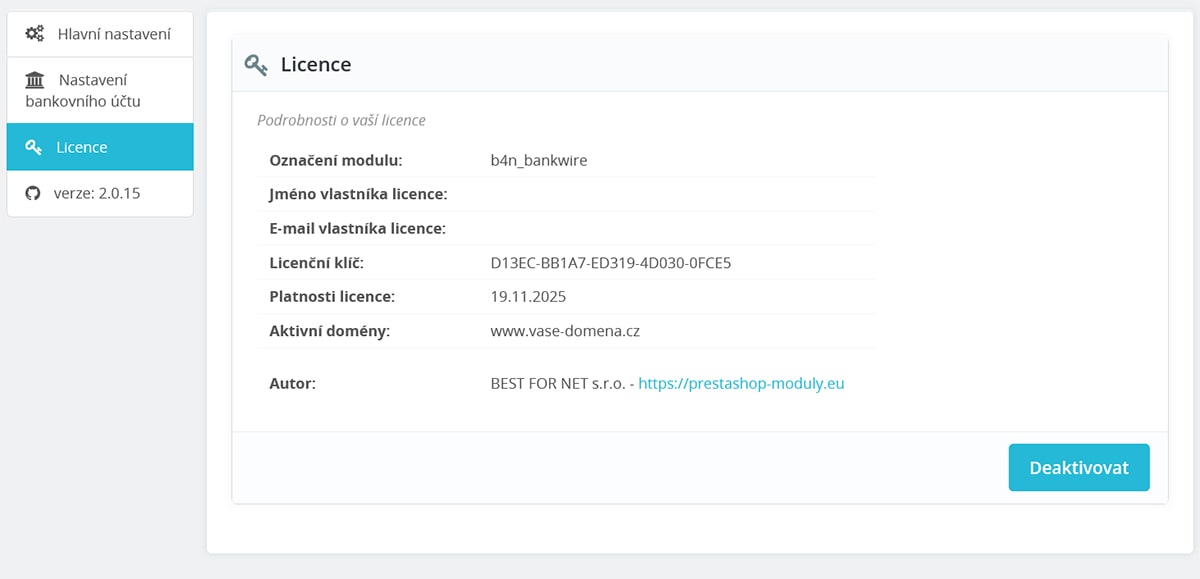
The license key for the purchased module is bound to the domain for which the module was ordered. You will find the license key in your order confirmation email or in your customer account under "Modules and licenses". Enter the license key in the module configuration under the "Licenses" tab.
How do I find out the Prestashop version and PHP version?
Log in to your e-shop administration and select "tools / information" or for older versions "tools / configuration information".


Please first check that the module is installed correctly and that you have purchased a module compatible with your version of Prestashop. Our modules are thoroughly tested on the default versions of Prestashop. If you have the correct version of Prestashop and module and still cannot get the module to work, please contact our technical department at podpora@prestashop-moduly.eu.