

Extensions
Module code
b4nemailattachments
Module version
3.1.1
PrestaShop
1.6, 1.7, 8, 9
Updated
25. 11. 2026

E-mail attachments - files and PDF invoices

Adds files and PDF order documents to your store's e-mails. Terms and conditions and the withdrawal form to the order confirmation, the invoice to the Payment accepted e-mail or the delivery slip to the Shipped e-mail – by language and customer group.

  • Files and order documents. Invoice, delivery slip, proforma invoice.
  • For each e-mail separately. From PrestaShop and modules.
  • Test e-mail. See right away what will be sent.
  • PrestaShop 1.6 to 9.
What you are buying
€59.00
incl. VAT · 48,76 € excl. VAT

Perpetual licence for 1 domain · 12 months of updates and support included

What does the support include?
  • new versions of the module to download in your account
  • answers to your questions about the module by e-mail

Installation, setup and custom changes are a paid service.

€30.00 incl. VAT · €24.79 excl. VAT

The support is extended by 12 months from the end of the current support, an expired one from the payment.

What does the support include?
  • new versions of the module to download in your account
  • answers to your questions about the module by e-mail

Installation, setup and custom changes are a paid service.

The extension is added to a licence in your account.

Sign in
  • Download right after payment
  • We are VAT payers

What it solves

Terms and conditions, withdrawal form and invoice right in the e-mail

The Czech Ministry of Industry and Trade (MPO) states that consumers should receive a confirmation of the contract with the required information on a durable medium, such as an e-mail, and that terms and conditions available only on a website are not a durable medium. On its own, PrestaShop can attach only the invoice and delivery slip to order status e-mails, not your own files.

The module adds your terms and conditions and withdrawal form to the order confirmation, the invoice to the Payment accepted e-mail or the delivery slip to the Shipped e-mail. Set it up once and your store sends the attachments automatically.

Who it is for

Is this module right for your store?

It is for you if

  • you sell to consumers and want to send them your terms and conditions and withdrawal form,
  • you currently send invoices or delivery slips by hand,
  • you have several languages or wholesale customers, and each should receive different documents,
  • you want attachments on e-mails from other modules too.

You do not need it if

  • you want attachments based on the products in the order – the module adds attachments by e-mail, language and customer group,
  • you want to generate PDFs from the text of a web page – it attaches ready-made files and order documents,
  • you send large files – attachments make every e-mail bigger, so a download link is usually better.

Benefits

Less manual work, fewer customer questions

Documents go out on their own

Terms, invoice and delivery slip are attached to the right e-mail, no forwarding needed.

The right attachments for everyone

Different files for each language, different ones for retail and wholesale.

Only what the order has

The invoice and delivery slip are attached once they have been issued. An invoice already attached by PrestaShop is not sent twice.

Check it right away

The test e-mail sends the selected e-mail to your address and lists the attachments it added.

New form? One file

When your terms or the model form change, you just replace the file in the catalog.

No core changes

On PrestaShop 1.7 to 9 via e-mail hooks, on 1.6 with a short override.

How it works

Set up an attachment in a few minutes

  1. Upload a file

    To Catalog > Files, for example your terms and conditions as a PDF.

  2. Choose the e-mail and attachments

    Order confirmation, Payment accepted, Shipped or an e-mail from another module.

  3. Pick languages and groups

    All are preselected; just untick the exceptions.

  4. Check with a test e-mail

    From then on, your store sends the attachments every time that e-mail goes out.

Examples

Examples

All attachments in one place

The examples come from a PrestaShop 9 test store.

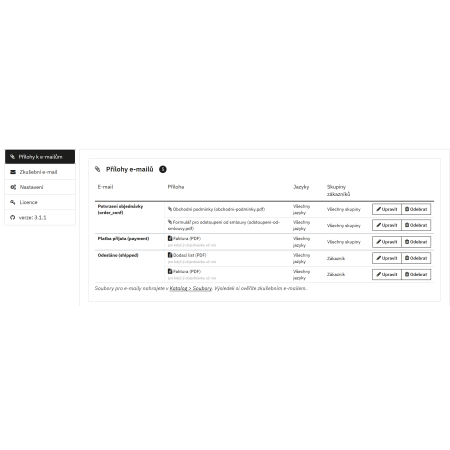
Overview by e-mail

Each e-mail appears once, with its attachments, languages and customer groups listed below it. Edit or remove with one click.
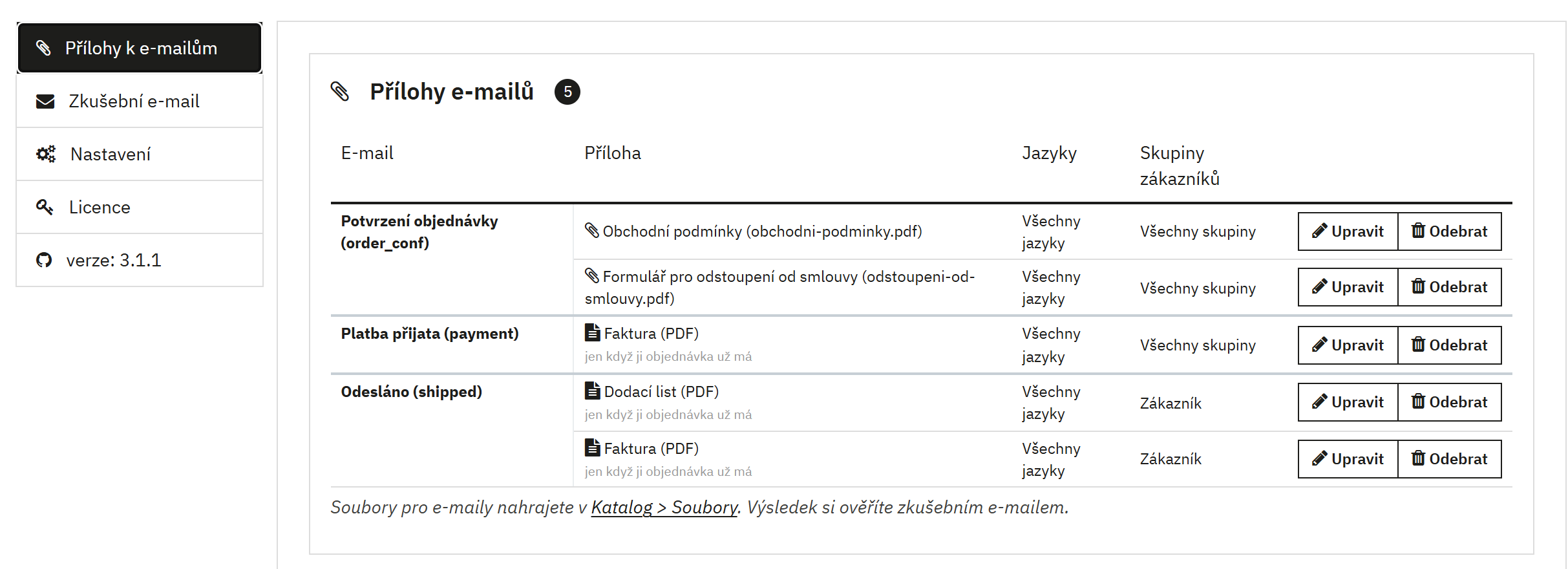
  • PrestaShop e-mails with clear names,
  • for the invoice and delivery slip, a note that they are attached once the order has them.
Overview of attachments by e-mail

Configure > E-mail attachments

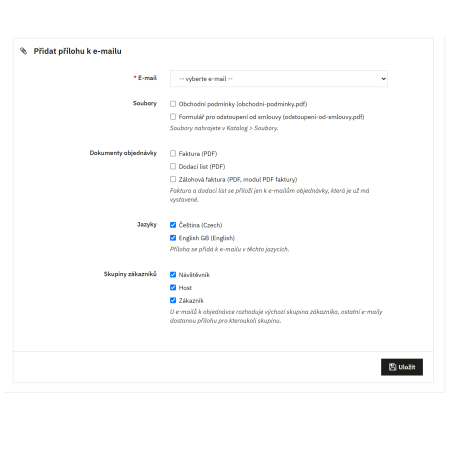
Adding an attachment

Pick the e-mail from a list, then tick files from the catalog and order documents.
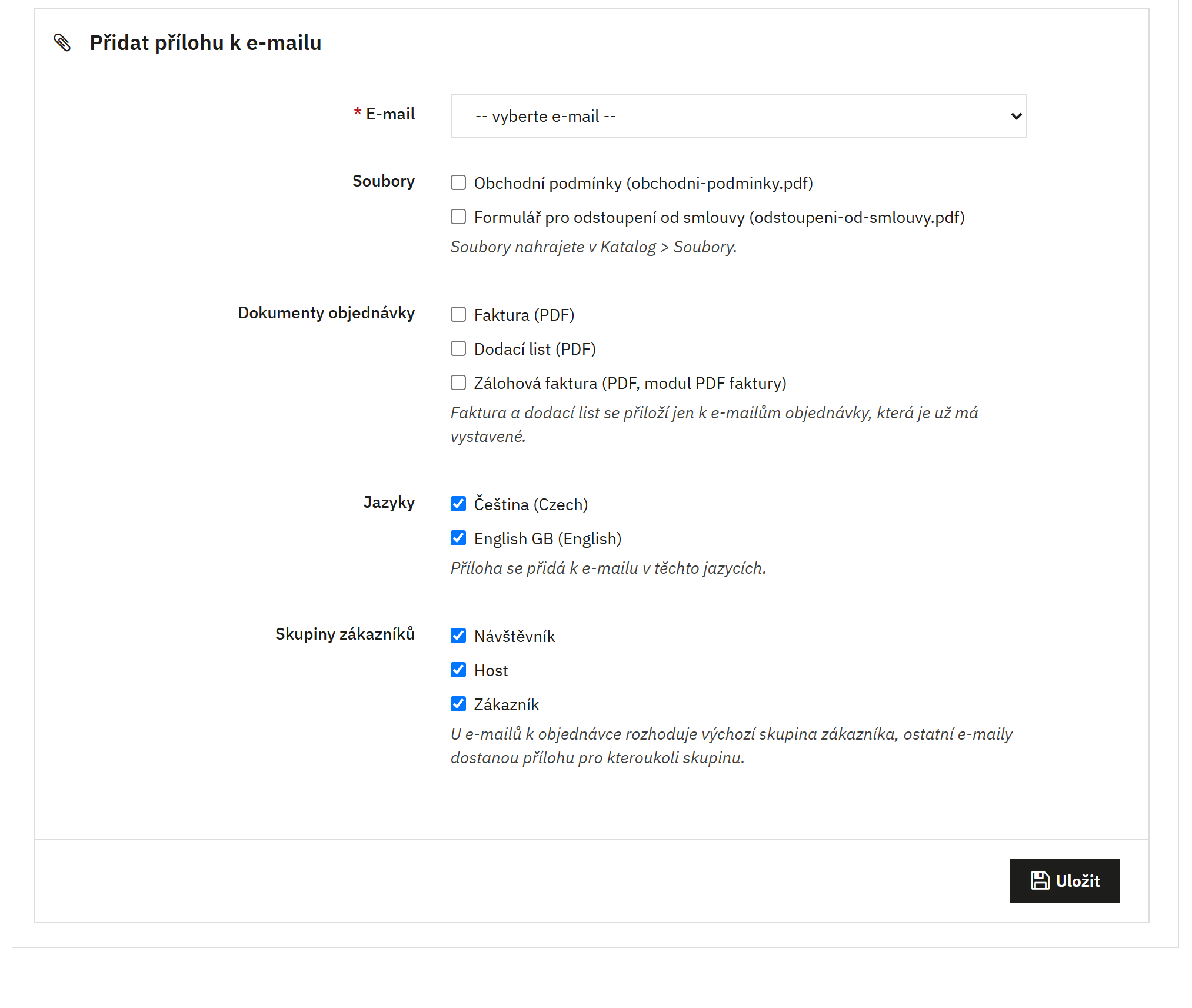
  • invoice, delivery slip and the proforma invoice from our PDF invoices module,
  • languages and customer groups,
  • e-mails from PrestaShop and installed modules.
Form for adding an e-mail attachment

Configure > adding an attachment

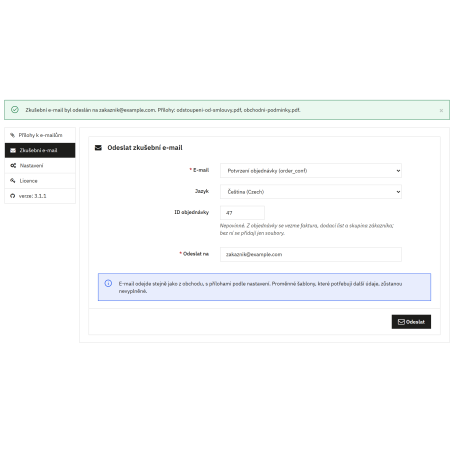
Test e-mail

Choose an e-mail, a language and optionally an order. The module sends it to the address you enter, just like the store would, and lists the attachments it added.
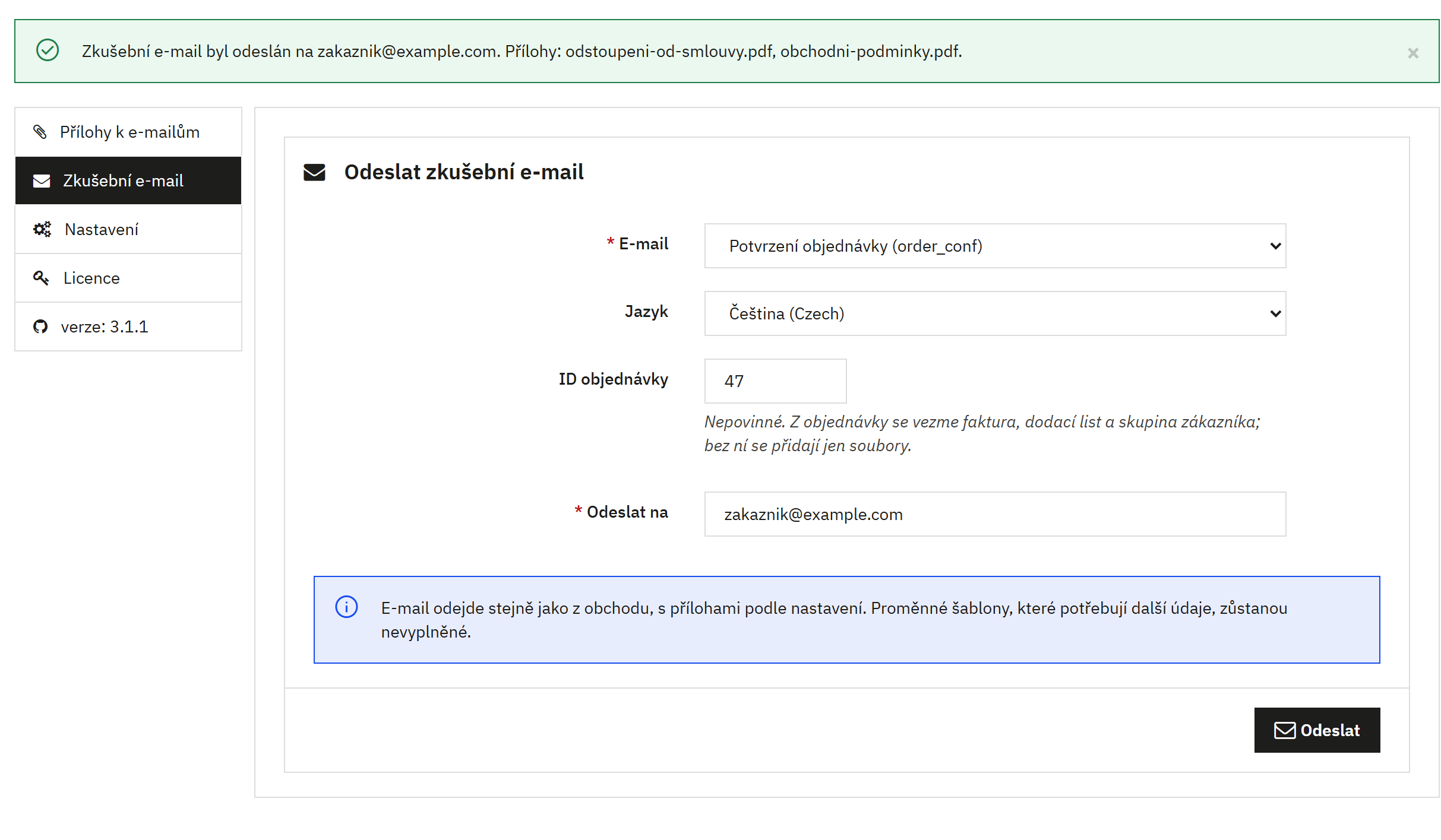
  • with an order, including the invoice and delivery slip,
  • you see straight away when no attachment applies to the e-mail.
Sent test e-mail with attachments

Configure > Test e-mail

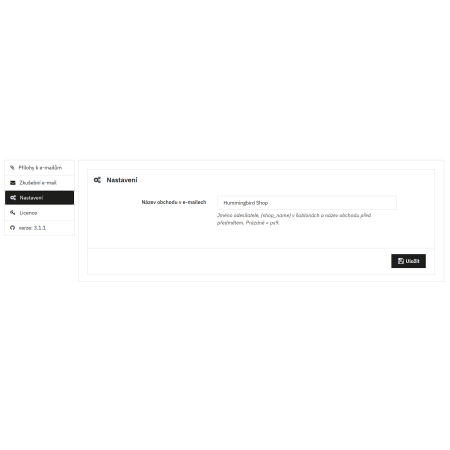
Store name in e-mails

A different name for the sender, the {shop_name} variable and the e-mail subject, for example without your company's legal form.
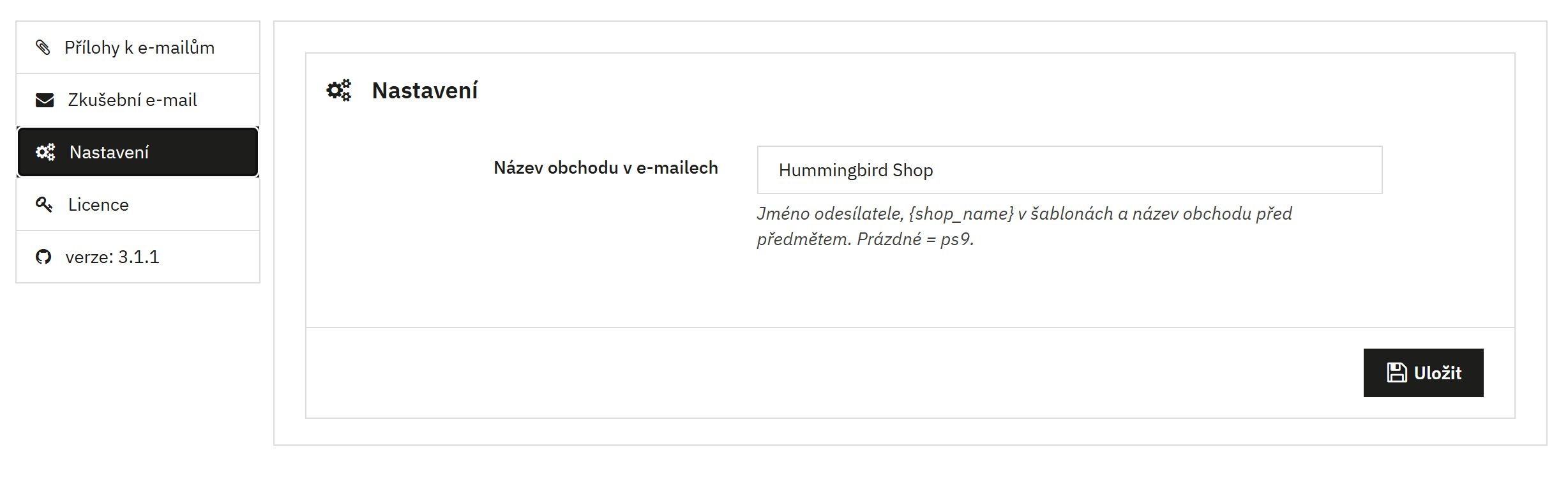
Store name in e-mails

Configure > Settings

Features

Everything the module can do

Attachments

  • files from Catalog > Files (PDFs, documents, images)
  • order invoice (PDF)
  • order delivery slip (PDF)
  • proforma invoice from our PDF invoices module
  • multiple attachments per e-mail

Rules

  • for every e-mail from PrestaShop and modules
  • by e-mail language
  • by the customer's default group for order e-mails
  • invoice and delivery slip only when the order has them
  • the invoice is never attached twice

Back office

  • attachment overview grouped by e-mail
  • edit and remove with one click
  • test e-mail with a list of attachments
  • store name in e-mails (sender, {shop_name}, subject)

Technical details

  • PrestaShop 1.6, 1.7, 8 and 9
  • 1.7 to 9 without overrides, 1.6 with a short Mail override
  • migration from the old b4n_email_attachments module
  • Czech, Slovak, Polish, German, English

Version history

  • 3.1.1 · 25 Nov 2026Clearer list of attachments and an envelope icon on the Send button.
  • 3.1.0 · 25 Nov 2026New tab for sending a test e-mail and a clearer list of attachments.
  • 3.0.1 · 25 Nov 2026Fixed installing the module alongside another module.
  • 3.0.0 · 25 Nov 2026New version for PrestaShop 1.6–9 with new e-mail attachment management and PDF fixes.

FAQ

Questions you ask us

Isn't it enough to have the terms and conditions on the website?

According to the Czech Ministry of Industry and Trade, terms and conditions available only on a website are not a durable medium, but an e-mail is. With the module, you send them as an attachment to the order confirmation. How exactly your store should meet its obligations is a question for a lawyer.

Why wasn't the invoice attached?

The order did not have one yet at that moment. The invoice is attached to e-mails sent after it has been issued, such as Payment accepted. The same goes for the delivery slip. You can check this with a test e-mail using the order ID.

PrestaShop already attaches the invoice. Won't it be there twice?

No. If the e-mail already contains the invoice, the module does not add it again.

Can I have different files for each language?

Yes. You set each attachment for selected languages, for example Czech terms for Czech e-mails and English terms for English ones.

Does it work for e-mails from other modules?

Yes. The list includes e-mails from installed modules too, and the attachment is added whenever your store sends that e-mail.

Does it work with customized e-mail templates?

Yes. The module adds attachments by e-mail name; the template content does not matter.

How large can attached files be?

The module does not limit the size; the limit is set by your mail server and your customers' mailboxes. We recommend PDFs of a few hundred kB.

How does the customer group selection work?

For order e-mails, the default group of the customer who placed the order decides. Other e-mails, such as registration, get the attachment for any selected group.

I have an old version of the module. Will I lose my settings?

No. The migration script renames the module in place; your attachments and the store name for e-mails are kept.

Parameters

Technical details

Module labelb4nemailattachments
Module version3.1.1
Prestashop version1.6, 1.7, 8, 9
Last update25. 11. 2026
License validityUnlimited in time
Support12 months
LocalisationCzech, English, German, Polish, Slovak
Minimum PHP version7.3
PHP Version7.3, 7.4, 8.0, 8.1, 8.2, 8.3

What the price includes

  • module for PrestaShop 1.6, 1.7, 8, 9
  • perpetual licence for 1 domain
  • 12 months of new versions to download in your account
  • 12 months of answers to your questions about the module by e-mail
  • help inside the module and a setup guide
  • invoice with VAT

Installation, setup and custom changes are a paid service. Custom development

Question about the module

Do you have a question about the module?

Tell us what you need to solve in your shop. We will advise whether the module helps you, how to set it up and what else you will need.

Product inquiry

Satisfaction
guarantee
Professional
approach
Technical
support
Online
payment

Get our latest news and special sales

You may unsubscribe at any moment. For that purpose, please find our contact info in the legal notice.