

Extensions
Module code
b4nblocks
Module version
3.0.12
PrestaShop
1.6, 1.7, 8, 9
Updated
25. 11. 2026

Custom content blocks

Your own blocks with text, images or HTML in theme positions – in the header, footer, columns and on the homepage. Show each block everywhere or only on selected pages.

  • No theme changes. You pick the position in the back office.
  • Editor or custom HTML. Separate content for each language.
  • Only where it belongs. Page list, module pages, stores.
  • PrestaShop 1.6 to 9.
What you are buying
€59.00
incl. VAT · 48,76 € excl. VAT

Perpetual licence for 1 domain · 12 months of updates and support included

What does the support include?
  • new versions of the module to download in your account
  • answers to your questions about the module by e-mail

Installation, setup and custom changes are a paid service.

€30.00 incl. VAT · €24.79 excl. VAT

The support is extended by 12 months from the end of the current support, an expired one from the payment.

What does the support include?
  • new versions of the module to download in your account
  • answers to your questions about the module by e-mail

Installation, setup and custom changes are a paid service.

The extension is added to a licence in your account.

Sign in
  • Download right after payment
  • We are VAT payers

What it solves

Your own content anywhere in the theme, no developer needed

A strip with shopping benefits above the footer, a holiday notice or a banner in the header. PrestaShop itself offers only one text block on the homepage; for everything else, you have to edit the theme.

The module gives you as many custom blocks as you like. You write each one in the editor and choose which theme position it goes into and on which pages it should appear.

Who it is for

Is this module right for you?

It is for you if

  • you want to change content in the header, footer or on the homepage yourself,
  • you need a block on some pages only,
  • you run several stores and each needs different content,
  • you run PrestaShop 1.6 to 9.

You do not need it if

  • one text block on the homepage is enough for you,
  • you want blocks by device, date or customer group – the module selects by pages and stores.

Benefits

Edit your site content yourself, any time

No theme changes

You place the block in a theme position from the back office. It stays in place after a theme update.

Editor or custom HTML

Edit text and images in the editor; for custom code, turn the editor off.

Only on selected pages

Show the block everywhere or only on chosen pages, such as the cart or a specific category.

Languages and stores

Write the content for each language separately and assign the block to selected stores only.

Turn on and off

Prepare a seasonal block in advance and turn it on when you need it. Reorder the blocks in a position by drag and drop.

Even PHP for advanced users

A block can run PHP code or a file. For experienced users only; otherwise keep it turned off.

How it works

From a new block to content on your site

  1. Add a block

    Click plus next to a theme position and name the block.

  2. Write the content

    In the editor for each language, or as custom HTML.

  3. Choose the pages

    Everywhere, or only on pages from the list.

  4. The block is live

    Once saved, it appears in the position you chose.

What you do

  • prepare the text and images,
  • choose the position and pages,
  • turn the block on.

Don't want to do it yourself? We will prepare the blocks for you.

What the module then does on its own

  • inserts the blocks into theme positions,
  • keeps track of pages, languages and stores,
  • keeps the order of the blocks.

What the module does not do

  • it does not select blocks by device, date or customer,
  • it does not add new positions to the theme,
  • it does not check the PHP code you put into a block.
Examples

Examples

A block on the site and its settings

The screenshots come from a test store running PrestaShop 9 with the Classic theme.

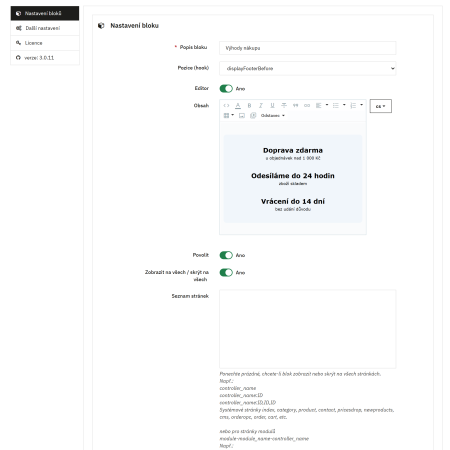
Shopping benefits above the footer

A strip with three shopping benefits on every page, in the position above the footer.

  • custom HTML and styles,
  • on desktop and mobile.
Custom block with shopping benefits above the store footer

Storefront → position above the footer

Block settings

Block description, theme position, content in the editor and the pages where the block is shown, or not shown.
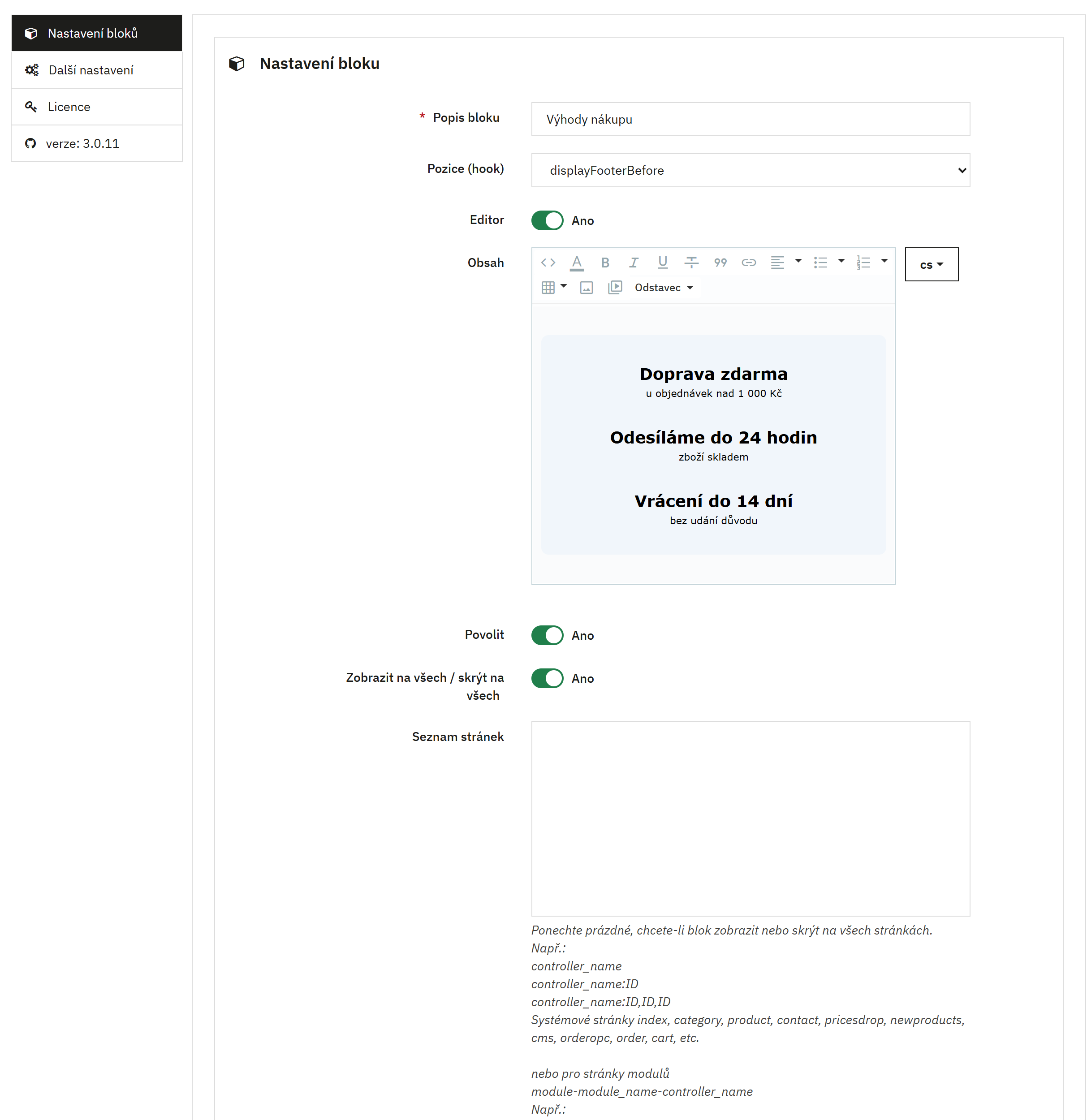
  • pages by controller and module pages,
  • content for each language,
  • assignment to stores.
Block settings with the editor and page selection

Configure → Block settings → Edit

Features

Everything the module can do

Blocks

  • unlimited number of blocks
  • 18 theme positions (header, footer, columns, homepage…)
  • editor or custom HTML
  • PHP content or file for advanced users

Display

  • everywhere or only on selected pages
  • module pages
  • languages and stores
  • drag-and-drop ordering

Back office

  • optional bxSlider library for sliders
  • PrestaShop 1.6, 1.7, 8 and 9
  • Czech, Slovak, Polish, German, English

Version history

  • 3.0.12 · 25 Nov 2026Option to insert another module's content into a block using a shortcode.
  • 3.0.11 · 24 Nov 2026PrestaShop 9 support and corrected typos in Czech texts.
  • 3.0.10 · 23 Nov 2026Core update: the settings now warn about missing data and confirm saving.
  • 3.0.9 · 22 Nov 2026Security fix and module core update.
  • 3.0.8 · 29 Jul 2026Fixed language version links that contained an unnecessary parameter.

FAQ

Questions you ask us

Do I need to know HTML?

No. You write the content in the editor, just like an e-mail. You only need HTML for more complex layouts.

Can a block be shown on some pages only?

Yes. Enter a list of pages, such as the cart, a specific category or a module page. The block then appears only there, or the other way round, everywhere except those pages.

My theme does not have the position I need. What now?

The module offers the positions your theme renders. If you need a different one, it has to be added to the theme. You can order that as a custom modification.

Is running PHP safe?

It is a feature for experienced users and it is turned off by default. Code in a block runs on the server, so only insert code from a trusted source.

Does it work on PrestaShop 9?

Yes, from version 3.0.11. The module supports PrestaShop 1.6, 1.7, 8 and 9 and multistore.

Can you help me with the blocks?

Yes. With the module, you can order installation and turnkey preparation of the blocks.

Parameters

Technical details

Module labelb4nblocks
Module version3.0.12
Prestashop version1.6, 1.7, 8, 9
Last update25. 11. 2026
License validityUnlimited in time
Support12 months
LocalisationCzech, English, German, Polish, Slovak
Minimum PHP version7.3
PHP Version7.3, 7.4, 8.0, 8.1, 8.2, 8.3

What the price includes

  • module for PrestaShop 1.6, 1.7, 8, 9
  • perpetual licence for 1 domain
  • 12 months of new versions to download in your account
  • 12 months of answers to your questions about the module by e-mail
  • help inside the module and a setup guide
  • invoice with VAT

Installation, setup and custom changes are a paid service. Custom development

Question about the module

Do you have a question about the module?

Tell us what you need to solve in your shop. We will advise whether the module helps you, how to set it up and what else you will need.

Product inquiry

Satisfaction
guarantee
Professional
approach
Technical
support
Online
payment

Get our latest news and special sales

You may unsubscribe at any moment. For that purpose, please find our contact info in the legal notice.