

Extensions
Module code
b4ncustomerchangeaccounttype
Module version
3.1.7
PrestaShop
1.6, 1.7, 8, 9
Updated
24. 11. 2026

Change account type - customer and guest

Adds a button to the customer detail page that turns a registered account into a guest and back again. Orders, invoices and addresses stay; the customer just can no longer log in.

  • Cancel a registration. Without deleting orders.
  • Convert back. With a link to set a password.
  • Duplicate check. Will not convert an e-mail that is already registered.
  • PrestaShop 1.6 to 9.
What you are buying
€59.00
incl. VAT · 48,76 € excl. VAT

Perpetual licence for 1 domain · 12 months of updates and support included

What does the support include?
  • new versions of the module to download in your account
  • answers to your questions about the module by e-mail

Installation, setup and custom changes are a paid service.

€30.00 incl. VAT · €24.79 excl. VAT

The support is extended by 12 months from the end of the current support, an expired one from the payment.

What does the support include?
  • new versions of the module to download in your account
  • answers to your questions about the module by e-mail

Installation, setup and custom changes are a paid service.

The extension is added to a licence in your account.

Sign in
  • Download right after payment
  • We are VAT payers

What it solves

Turn a registered customer into a guest in one click

A customer wants their account deleted, but their orders and invoices have to stay in your store. Or they registered by mistake and now receive e-mails they do not want. PrestaShop can convert a guest into a customer, but not the other way round.

The module adds a button to the customer detail page that turns a registered account into a guest. Orders, addresses and history stay. A guest can also be converted back into a customer and receives an e-mail with a link to set a password.

Who it is for

Is this module right for your store?

It is for you if

  • customers ask you to cancel their registration,
  • you need to close an account while keeping the orders,
  • guests and customers are mixed up in your data and you want to sort them out.

You do not need it if

  • converting guests into customers is enough – PrestaShop does that on its own,
  • the customer has to stay in other groups (B2B, wholesale) – groups are reset during the conversion,
  • you want bulk conversions or want customers to cancel their registration themselves.

Benefits

Request handled, orders kept

One button

Convert right on the customer detail page, without touching the database.

Orders stay

The account is not deleted. Orders, invoices and addresses stay with the guest.

The customer sets the password

When converted back, the customer receives an e-mail with a link to set a password.

Duplicate check

If a registered account with the same e-mail already exists, the module does not convert the guest and offers a link to that account instead.

How it works

Conversion on the customer detail page

  1. Open the customer

    Go to Customers > Customers and view the customer detail.

  2. Click convert

    A registered customer has a Convert to guest button, a guest has a Convert to customer button.

  3. Done

    The account changes its type and group. When converting to a customer, an e-mail is sent.

Examples

Examples

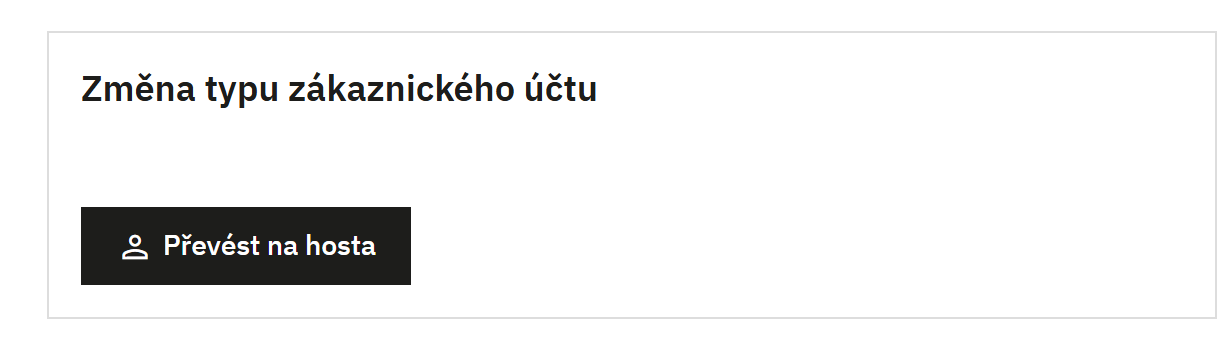
Panel on the customer detail page

The example comes from a PrestaShop 9 test store.

Convert to guest

For a registered customer, the module shows a Convert to guest button. The customer can then no longer log in, and the account behaves like a guest checkout.
  • orders and addresses stay,
  • guests get a Convert to customer button.
Change customer account type panel on the customer detail page

Customers > customer detail

Features

Everything the module can do

Conversions

  • registered customer to guest
  • guest to registered customer
  • e-mail with a link to set a password

Checks

  • warning about an existing account with the same e-mail
  • detects guests by customer group as well
  • panel on/off switch in the settings

Technical details

  • multistore
  • PrestaShop 1.6, 1.7, 8 and 9
  • Czech, Slovak, Polish, German, English

Version history

  • 3.1.7 · 24 Nov 2026Translated warning about an existing customer with the same e-mail.
  • 3.1.6 · 24 Nov 2026Fixed converting a guest to a customer in PrestaShop 9.
  • 3.1.5 · 23 Nov 2026Module core update.
  • 3.1.4 · 22 Nov 2026Added missing translations and module core update.
  • 3.1.2 · 29 Jul 2026Fix of an unwanted parameter in links to the shop's language versions.

FAQ

Questions you ask us

Does converting to a guest delete orders?

No. The account stays with its orders, invoices and addresses; it just becomes a guest account without login.

Does the customer get an e-mail about the conversion?

When a guest is converted to a customer, yes, with a link to set a password (in PrestaShop 1.6 with a generated password). When converting to a guest, the module sends no e-mail.

What happens to the customer groups?

A guest gets only the Guest group, a customer only the default Customer group. Other groups, such as B2B, need to be added again after the conversion.

Why can't the guest be converted?

A registered account with the same e-mail already exists in your store. Instead of converting, the module offers a link to that account.

Can PrestaShop do this without the module?

Converting a guest to a customer, yes. Converting a registered customer to a guest is not in PrestaShop – the module adds it.

Parameters

Technical details

Module labelb4ncustomerchangeaccounttype
Module version3.1.7
Prestashop version1.6, 1.7, 8, 9
Last update24. 11. 2026
License validityUnlimited in time
Support12 months
LocalisationCzech, English, German, Polish, Slovak
Minimum PHP version7.3
PHP Version7.3, 7.4, 8.0, 8.1, 8.2, 8.3

What the price includes

  • module for PrestaShop 1.6, 1.7, 8, 9
  • perpetual licence for 1 domain
  • 12 months of new versions to download in your account
  • 12 months of answers to your questions about the module by e-mail
  • help inside the module and a setup guide
  • invoice with VAT

Installation, setup and custom changes are a paid service. Custom development

Question about the module

Do you have a question about the module?

Tell us what you need to solve in your shop. We will advise whether the module helps you, how to set it up and what else you will need.

Product inquiry

Satisfaction
guarantee
Professional
approach
Technical
support
Online
payment

Get our latest news and special sales

You may unsubscribe at any moment. For that purpose, please find our contact info in the legal notice.