



Marketing
Module code
b4ngooglereviews
Module version
3.0.12
PrestaShop
1.6, 1.7, 8, 9
Updated
23. 11. 2026

Google Customer Reviews

Connects your store to Google Customer Reviews. After an order, it offers the customer Google's survey and shows a badge with your store rating on the site.

  • Survey after every order. The module fills in the order details and the estimated delivery.
  • Rating badge. Bottom right or left, with offsets for desktop and mobile.
  • Product ratings. The module sends Google the EAN and UPC of purchased products.
  • No theme changes. All you need is the Merchant ID from Google Merchant Center.
What you are buying
€59.00
incl. VAT · 48,76 € excl. VAT

Perpetual licence for 1 domain · 12 months of updates and support included

What does the support include?
  • new versions of the module to download in your account
  • answers to your questions about the module by e-mail

Installation, setup and custom changes are a paid service.

€30.00 incl. VAT · €24.79 excl. VAT

The support is extended by 12 months from the end of the current support, an expired one from the payment.

What does the support include?
  • new versions of the module to download in your account
  • answers to your questions about the module by e-mail

Installation, setup and custom changes are a paid service.

The extension is added to a licence in your account.

Sign in
  • Download right after payment
  • We are VAT payers

What it solves

Store ratings from Google, collected after every order

Google Customer Reviews is a free Google Merchant Center program. After a purchase, the customer gets a short survey from Google, and the answers build a store rating that Google shows in search results and ads.

The module adds the survey offer to the order confirmation page and a badge with your store rating to your site. You do not need to add anything to the theme.

Who it is for

Is this module right for you?

It is for you if

  • you have a Google Merchant Center account,
  • you want to collect store ratings from Google,
  • you want to show a rating badge on your site,
  • you run PrestaShop 1.6 to 9.

You do not need it if

  • you do not use Merchant Center,
  • you want to display Google Maps reviews – the module works with Google Customer Reviews.

You turn the program on in Merchant Center. Google decides the survey text, its language and when the rating appears.

Benefits

More ratings with no extra work

Survey after every order

On the order confirmation page, the customer is offered Google's survey. The module fills in the order details itself.

Survey after delivery

The module calculates the estimated delivery from the order date and the number of days you set. Google sends the survey only after that.

Rating badge

Google's badge at the bottom right or bottom left, with separate offsets for desktop and mobile.

Product ratings too

If your products have an EAN or UPC, the module sends them to Google, which then asks about the purchased products as well.

By country and language

The delivery country and the badge language are taken from the order and the store.

No theme changes

All you need is the Merchant ID. For a badge in a custom spot, the module shows you the code to insert.

How it works

From order to store rating

  1. The customer places an order

    Google offers them the survey on the confirmation page.

  2. They agree to the survey

    The module passes on the order number, e-mail, country and estimated delivery.

  3. Google sends the survey

    After the estimated delivery, the customer rates the purchase.

  4. Store rating

    Once Google has enough ratings, it shows them in the badge on your site.

What you do once

  • turn on Google Customer Reviews in Merchant Center,
  • enter the Merchant ID in the module,
  • set the number of days to delivery,
  • choose where the survey and the badge appear.

Don't want to do it yourself? We will set it up for you.

What the module then does on its own

  • offers the survey after every order,
  • calculates the estimated delivery,
  • sends the EAN and UPC of products,
  • displays the badge.

What the module does not do

  • it does not change the survey text – Google decides that,
  • it does not display Google Maps reviews,
  • it does not calculate the rating – Google does.
Examples

Examples

Rating on the site, survey after the order and settings

The example comes from a test store running PrestaShop 9 with a sample Merchant ID.

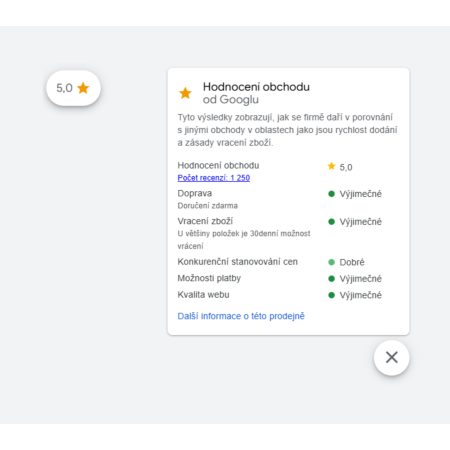
Google store rating on the site

A floating button with your store rating. When clicked, it shows the rating and how the store performs on shipping, returns, pricing and payments.
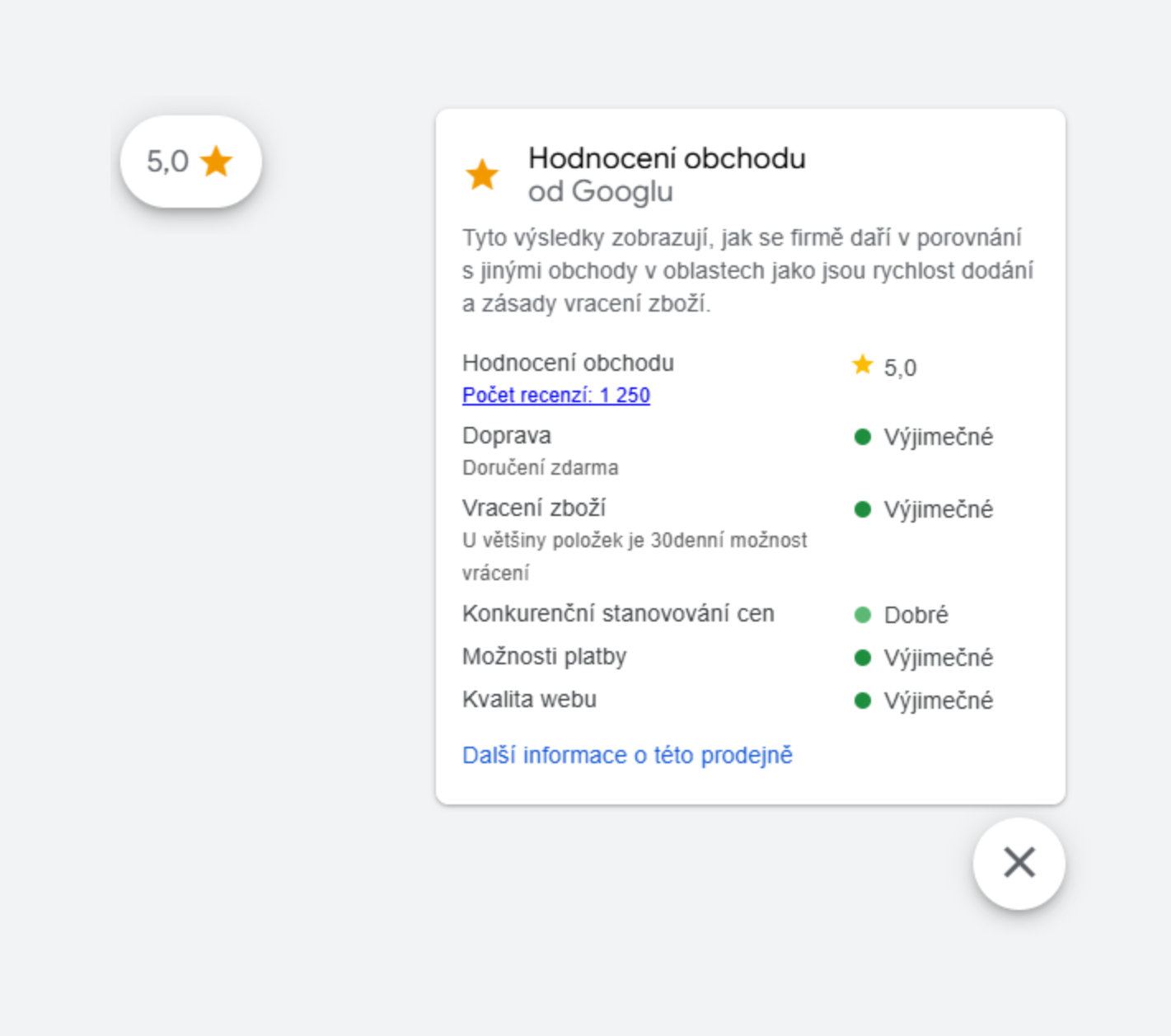
  • the widget Google introduced in place of the former badge,
  • offset from the edge set separately for desktop and mobile,
  • the rating is provided by Google.
Google store rating button and the opened rating

Client's store → button and opened rating (anonymized)

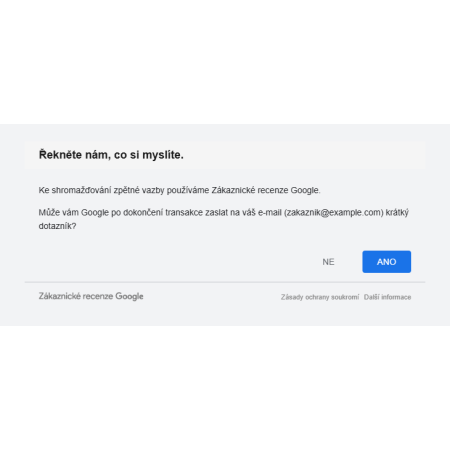
Survey after the order

On the order confirmation page, Google offers the customer a short survey. If they agree, Google e-mails it to them after delivery.
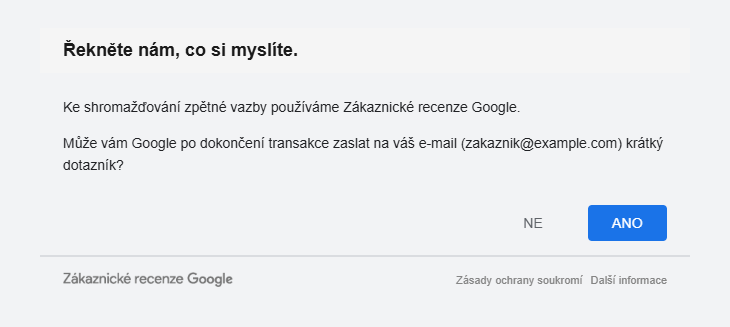
  • you set how many days after the order the survey is sent,
  • you choose the position of the window in the module,
  • the customer can decline.
Google Customer Reviews survey offer after an order

Client's store → order confirmation (anonymized)

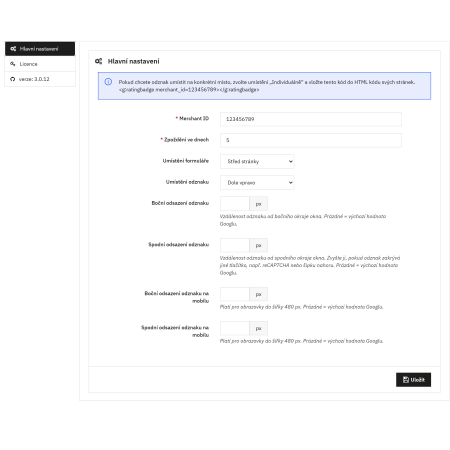
Merchant ID, survey and badge

Enter the Merchant ID from Merchant Center and the number of days to delivery. Choose where the survey offer and the badge appear.
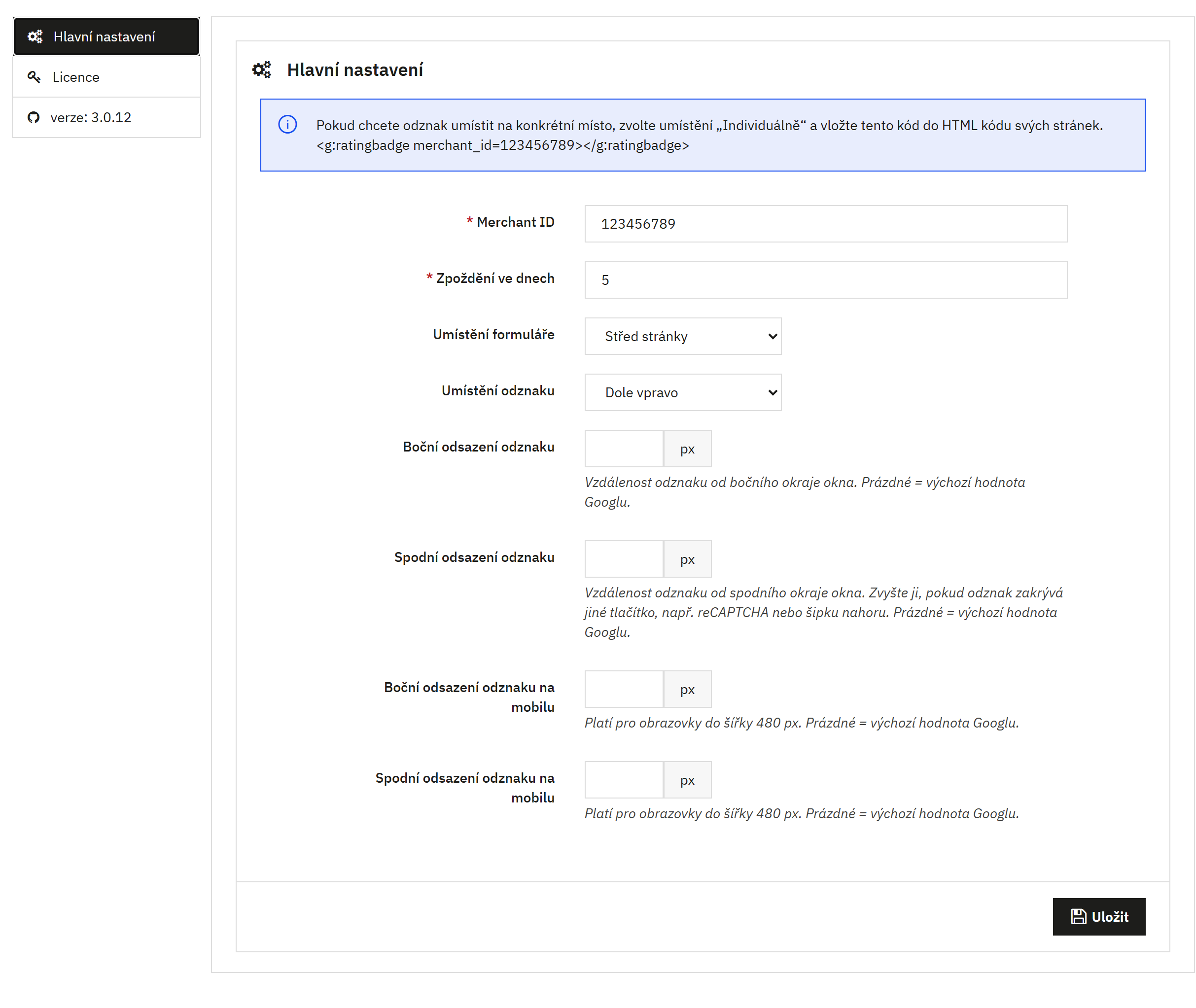
  • survey in the center of the page, in a corner or at the bottom,
  • badge at the bottom right, bottom left or in a custom spot,
  • badge offset set separately for desktop and mobile.
Google Customer Reviews module settings

Configure → Main settings

Features

Everything the module can do

Survey

  • survey offer on the order confirmation page
  • order number, e-mail and delivery country
  • estimated delivery by number of days
  • product EAN and UPC for product ratings

Badge

  • Google badge at the bottom right or left
  • offset for desktop and mobile
  • code for a custom position
  • language and country by store

Back office

  • separate settings for each store
  • PrestaShop 1.6, 1.7, 8 and 9
  • Czech, Slovak, Polish, German, English

Version history

  • 3.0.12 · 23 Nov 2026Fixes and additions to the module translations.
  • 3.0.11 · 23 Nov 2026Core update: the settings now warn about missing data and confirm saving.
  • 3.0.10 · 22 Nov 2026Module core update.
  • 3.0.9 · 11 Nov 2026New Google rating badge with region, margin settings and survey opt-in fixes.
  • 3.0.8 · 29 Jul 2026Fix of an unwanted parameter in links to language versions of pages.

FAQ

Questions you ask us

Is the program paid?

Google Customer Reviews is free. You need a Google Merchant Center account, where you turn the program on.

When will I see the rating in the badge?

Only once Google has enough ratings for the given country. According to Google, that is roughly 100 reviews. Until then, the badge shows no rating.

When does the customer get the survey?

After the estimated delivery date, which the module calculates from the order date and the number of days in the settings. Google then sends the survey.

Does the survey have to be offered to all customers?

Under Google's rules, yes: you must not limit the offer to satisfied customers or give rewards for reviews. The module offers it on every order confirmation.

Does the badge show on mobile?

Yes. You set the badge offset separately for mobile so it does not cover another button.

Does it work for Slovakia?

The module sends the delivery country from the order. Google decides which countries and languages the survey supports. You will find the current list in the Merchant Center help.

Can you help me with the setup?

Yes. With the module, you can order turnkey installation and setup, including a check of the survey on the order confirmation page.

Parameters

Technical details

Module labelb4ngooglereviews
Module version3.0.12
Prestashop version1.6, 1.7, 8, 9
Last update23. 11. 2026
License validityUnlimited in time
Support12 months
LocalisationCzech, English, German, Polish, Slovak
Minimum PHP version7.3
PHP Version7.3, 7.4, 8.0, 8.1, 8.3

What the price includes

  • module for PrestaShop 1.6, 1.7, 8, 9
  • perpetual licence for 1 domain
  • 12 months of new versions to download in your account
  • 12 months of answers to your questions about the module by e-mail
  • help inside the module and a setup guide
  • invoice with VAT

Installation, setup and custom changes are a paid service. Custom development

Question about the module

Do you have a question about the module?

Tell us what you need to solve in your shop. We will advise whether the module helps you, how to set it up and what else you will need.

Product inquiry

Satisfaction
guarantee
Professional
approach
Technical
support
Online
payment

Get our latest news and special sales

You may unsubscribe at any moment. For that purpose, please find our contact info in the legal notice.