

Marketing
Module code
b4nproductdetaillistcartrules
Module version
3.2.3
PrestaShop
1.6, 1.7, 8, 9
Updated
24. 11. 2026

Discount codes on products - price with code

Shows selected discount codes right on the product page and in product listings, together with the price the customer pays with the code. One click adds the product to the cart and applies the code.

  • Discounted price at a glance. On the product page and in listings.
  • One click. Product in the cart, code applied.
  • Countdown and discount badge. Six box designs.
  • PrestaShop 1.6 to 9.
What you are buying
€59.00
incl. VAT · 48,76 € excl. VAT

Perpetual licence for 1 domain · 12 months of updates and support included

What does the support include?
  • new versions of the module to download in your account
  • answers to your questions about the module by e-mail

Installation, setup and custom changes are a paid service.

€30.00 incl. VAT · €24.79 excl. VAT

The support is extended by 12 months from the end of the current support, an expired one from the payment.

What does the support include?
  • new versions of the module to download in your account
  • answers to your questions about the module by e-mail

Installation, setup and custom changes are a paid service.

The extension is added to a licence in your account.

Sign in
  • Download right after payment
  • We are VAT payers

What it solves

A discount code customers see and use with one click

Discount codes often stay buried in a newsletter or a banner. Customers forget them, or don't copy the code and buy without the discount – or not at all.

The module shows selected codes right on the product page and in listings, together with the price the customer pays with the code. One click adds the product to the cart and applies the code.

Who it is for

Is this module right for your store?

It is for you if

  • you offer discount codes for promotions, Black Friday or registered customers,
  • you want customers to see the discounted price before they add the product to the cart,
  • you have a large catalog and the code applies only to some products.

You do not need it if

  • you give discounts without a code (automatic cart rule) – the module only shows rules with a code,
  • your discount requires a minimum cart value – the module ignores it and shows the code on cheaper products too,
  • you cannot run a cron job on your server.

Benefits

More discounted purchases, less code copying

Discounted price at a glance

On the product page and in listings: the code, the price with the code and how much customers save.

One click

The product is added to the cart and the code is applied automatically. Customers don't have to copy anything.

Only where the code applies

The module checks the customer group, the store and restrictions on products, categories and brands.

Countdown to the end of the promotion

Six box designs with a discount badge, a countdown and a button to copy the code.

How it works

From code to a discounted purchase

  1. You choose the codes

    In the module, select active cart rules with a code and where they should appear.

  2. The module calculates prices

    A cron job calculates the price with the code for every product, language, currency and customer group.

  3. Customers see the code

    On the product page and in listings, only while the code is valid and not used up.

  4. They click and buy

    The product is in the cart and the discount is applied.

Examples

Examples

The code box in your store and its settings

The examples come from a test store running PrestaShop 9.

On the product page

Below the product price: a box with the discount, the price with the code and a button to copy the code. The Buy with code link adds the product to the cart with the code already applied.
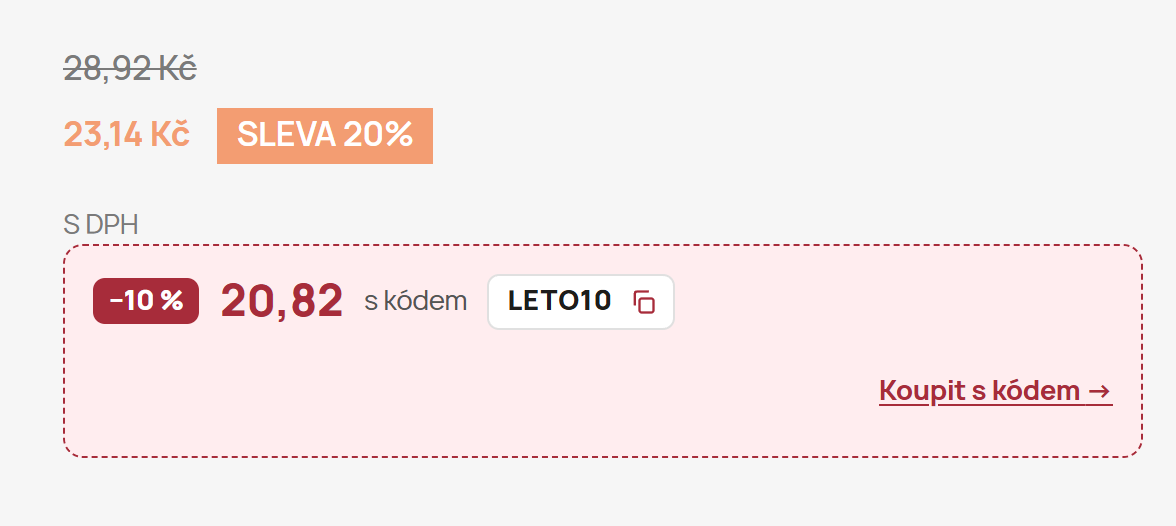
  • price with code calculated from the current price,
  • discount badge as a percentage or an amount.
Discount code box on the product page

Product page – Coupon design

Design that fits your shop

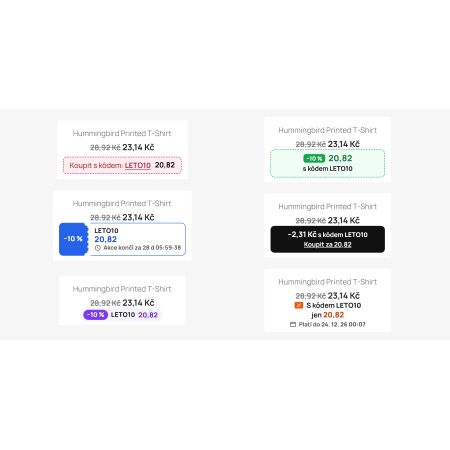
You set the layout, colors and extras of the box to suit you, so the box matches your theme and the current promotion. The sample shows the same code with six different settings.
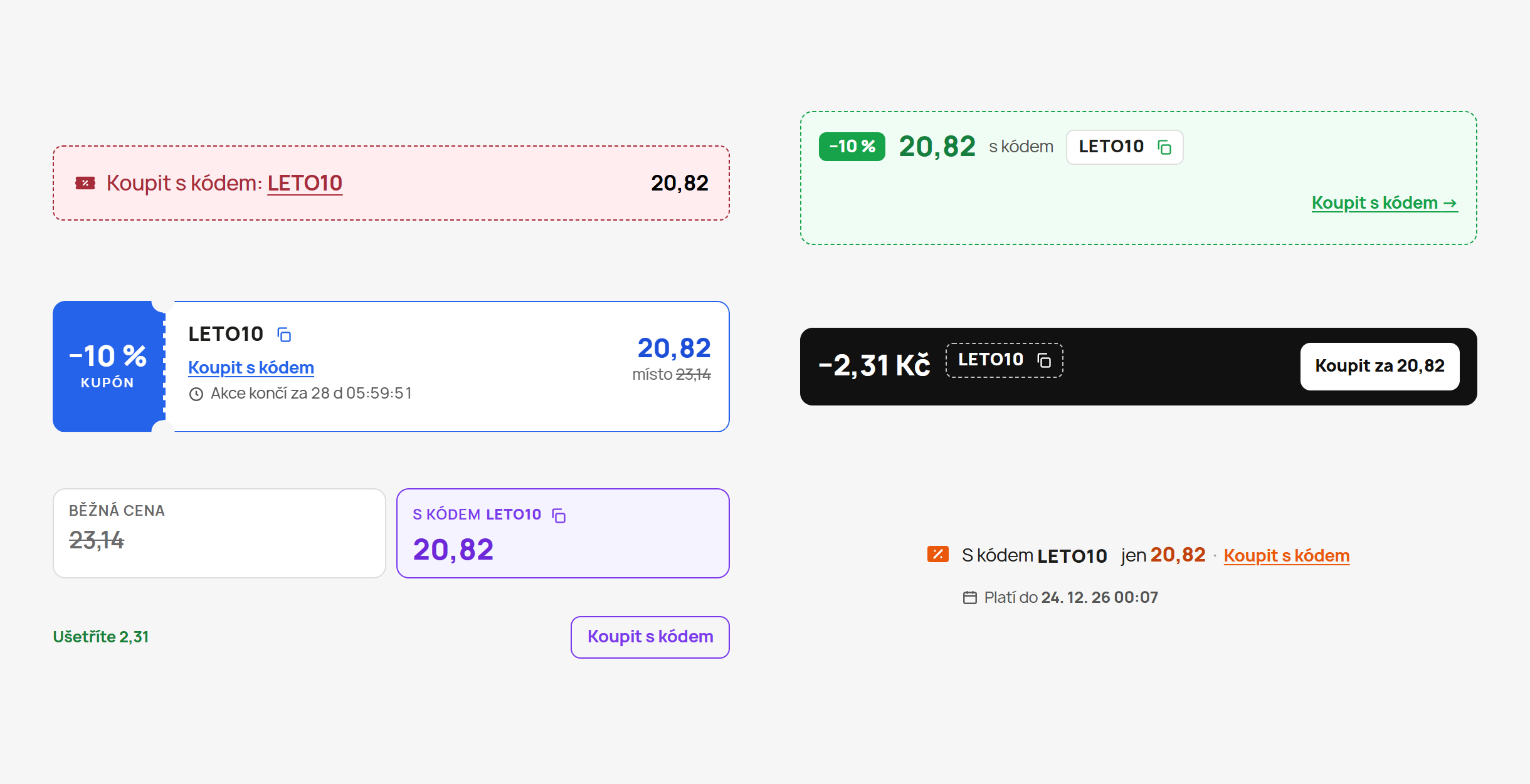
  • Classic, Coupon, Ticket, Price comparison, Line or Banner layout,
  • your own main color, background and price color,
  • badge as a percentage, an amount or none,
  • countdown to the end of the promotion or the validity date.
Discount code box on the product page with six appearance settings

Product page – six appearance settings

In product listings

The code and the price with the code right in the product card in categories and other product listings. The listing design is set separately, so the box fits even a narrow card.
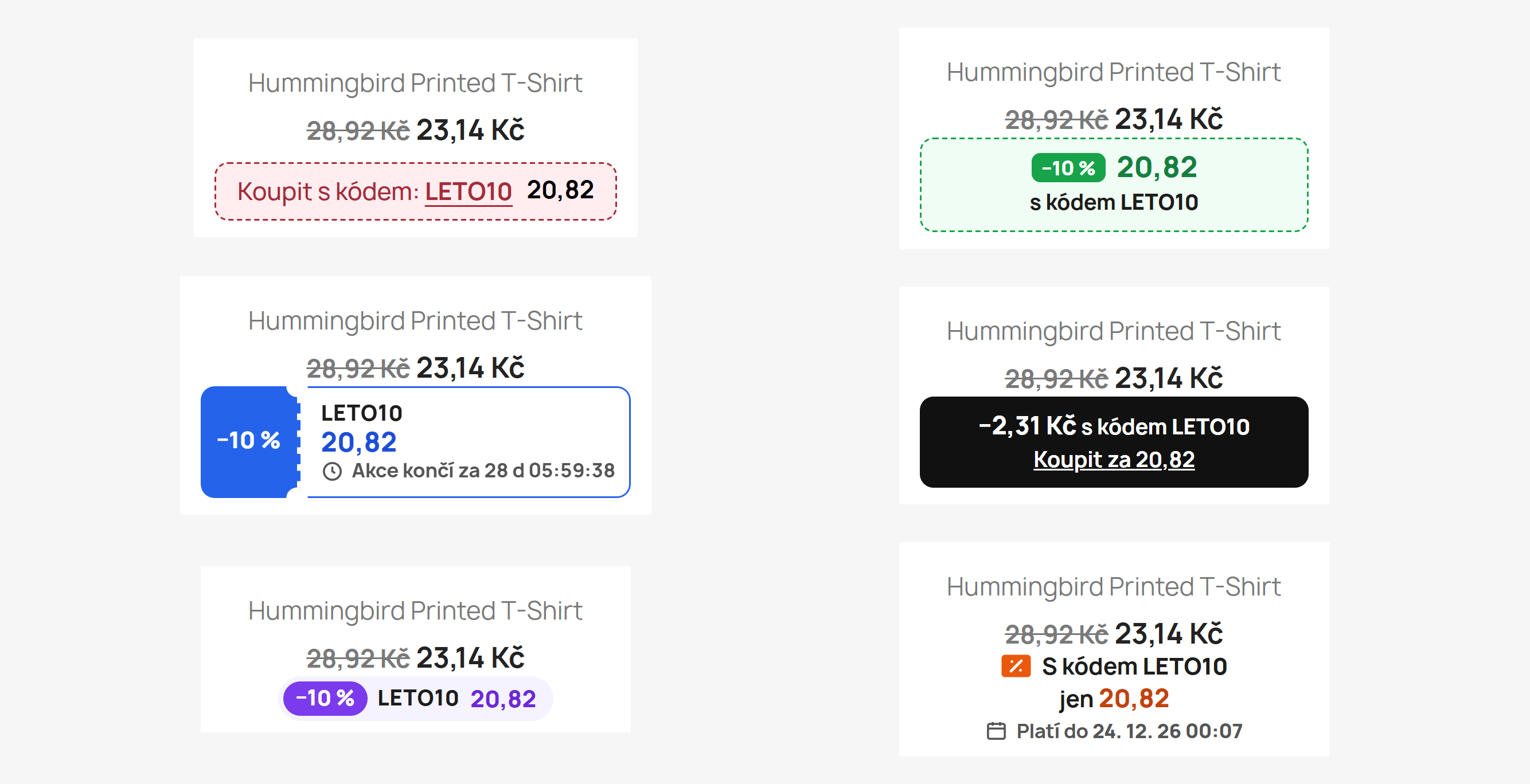
  • six designs for listings, including the compact Pill and Line,
  • only on products the code applies to.
Discount code in product cards in a listing with six appearance settings

Product listing – six appearance settings

Choosing codes and placements

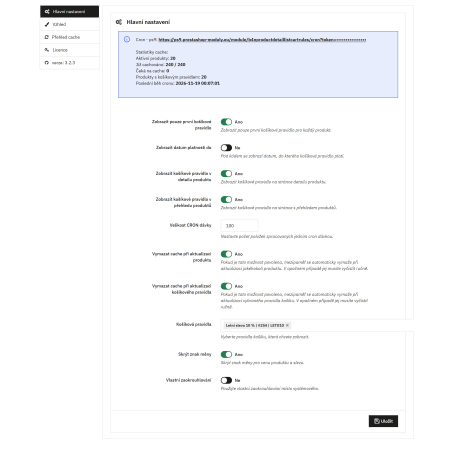
Select the cart rules with a code, where the box appears and whether to show only the first code per product. At the top you will find the cron URL and the calculation status.
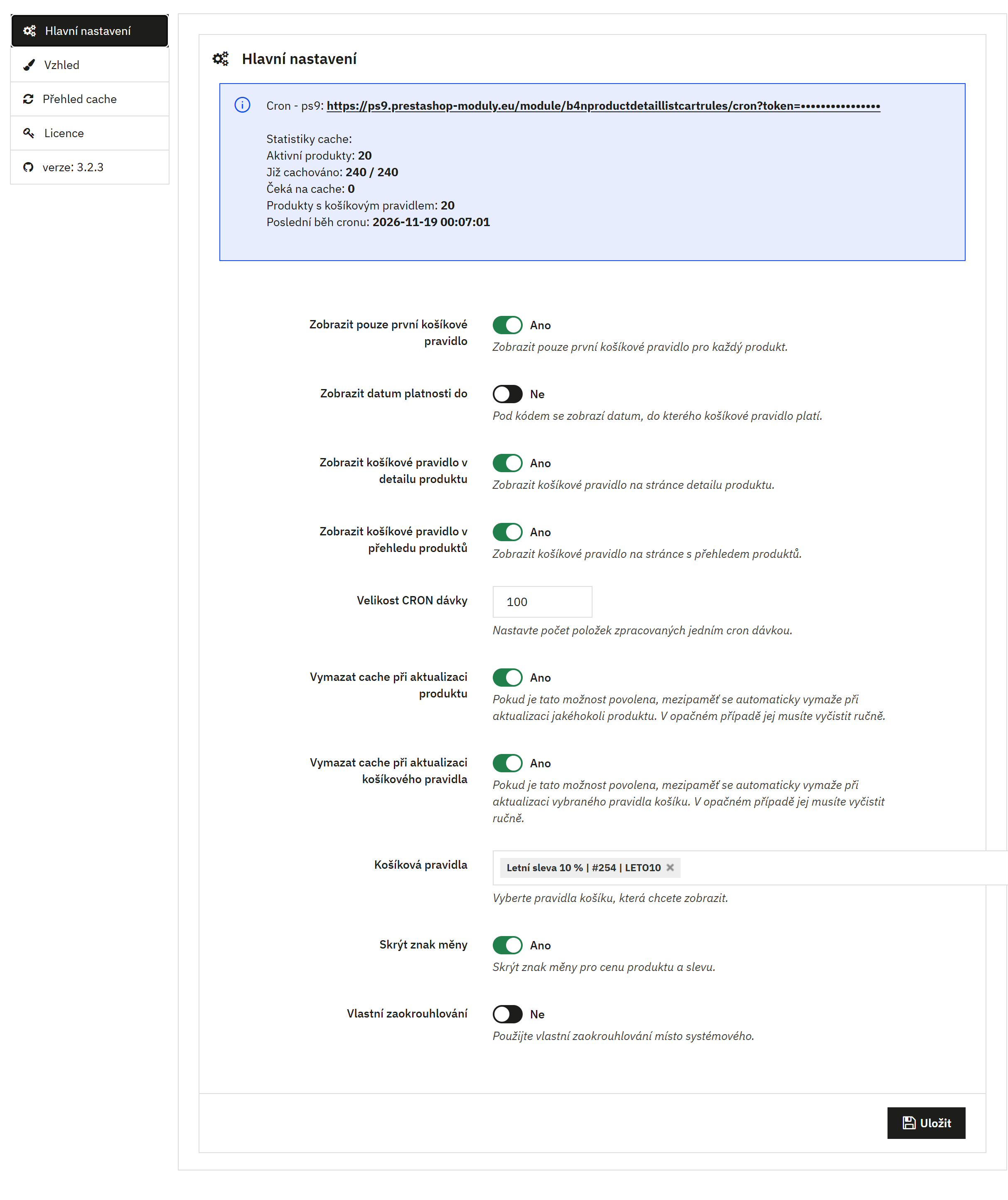
  • validity date under the code,
  • custom rounding for each currency.
Highlighted coupons settings

Configure → Main settings

Design with preview

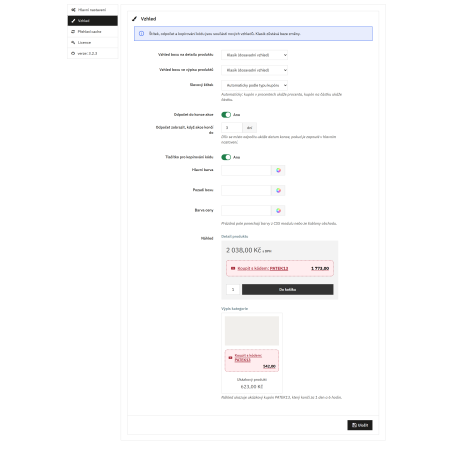
Six designs for the product page, six for listings, a discount badge, a countdown and custom colors. The preview shows the result instantly.
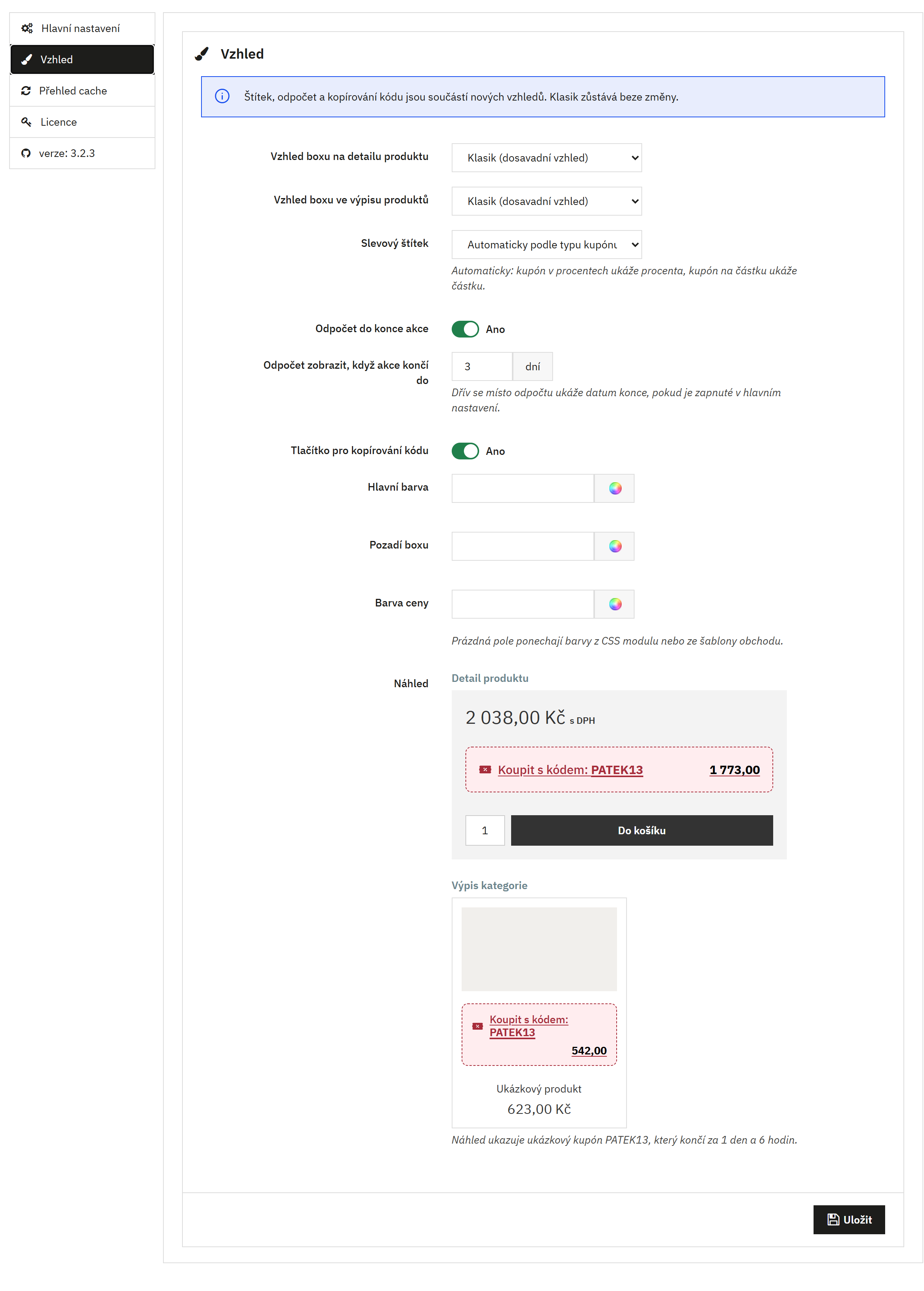
  • countdown only for the last few days of the promotion,
  • button to copy the code.
Code box design settings with preview

Configure → Appearance

Features

Everything the module can do

Display

  • code box on the product page and in listings
  • discounted price and discount amount
  • 6 designs, discount badge, countdown
  • code copying, custom colors

Calculation

  • check of the group, store and rule restrictions
  • prices per language, currency, store and group
  • validity and remaining quantity checked on every display
  • cron and manual cache build

Technical details

  • one-click add to cart with the code
  • multiple stores (multistore)
  • PrestaShop 1.6, 1.7, 8 and 9
  • Czech, Slovak, Polish, German, English

Version history

  • 3.2.3 · 24 Nov 2026Security fix and corrected module description in translations.
  • 3.2.2 · 23 Nov 2026Module core update.
  • 3.2.1 · 18 Nov 2026Fixed display of cart rules on the product page in PrestaShop 9 and module core update.
  • 3.2.0 · 14 Nov 2026New discount box layouts, countdown to the end of the offer and a discount badge.
  • 3.1.4 · 14 Nov 2026Module core update and fix of untranslated texts in PrestaShop 1.6.

FAQ

What you ask us

Which discounts does the module show?

The active cart rules with a code that you select. It does not show rules without a code, rules for one specific customer or rules restricted to a country.

Does the code disappear when the promotion ends?

Yes. The module checks validity, status and remaining uses on every display, so an expired or used-up code disappears immediately.

Why do I need a cron job?

The module calculates the price with the code in advance for products, languages, currencies and customer groups, so your store does not slow down. Without cron, you can start the calculation with a button in the back office.

Does it take the minimum cart value into account?

No. The module shows a code with a minimum cart value on cheaper products too. So do not use it for such codes, or keep in mind that the discount only applies above the limit.

What price does the module show for combinations?

The price of the default combination for 1 piece. The box does not show combination price differences or volume discounts.

Does it work with my theme?

The box is inserted into the standard theme positions next to the product price. Themes based on Classic have them; for other themes, we are happy to check.

Parameters

Technical details

Module labelb4nproductdetaillistcartrules
Module version3.2.3
Prestashop version1.6, 1.7, 8, 9
Last update24. 11. 2026
License validityUnlimited in time
Support12 months
LocalisationCzech, English, German, Polish, Slovak
Minimum PHP version7.3
PHP Version7.3, 7.4, 8.0, 8.1, 8.2, 8.3

What the price includes

  • module for PrestaShop 1.6, 1.7, 8, 9
  • perpetual licence for 1 domain
  • 12 months of new versions to download in your account
  • 12 months of answers to your questions about the module by e-mail
  • help inside the module and a setup guide
  • invoice with VAT

Installation, setup and custom changes are a paid service. Custom development

Question about the module

Do you have a question about the module?

Tell us what you need to solve in your shop. We will advise whether the module helps you, how to set it up and what else you will need.

Product inquiry

Satisfaction
guarantee
Professional
approach
Technical
support
Online
payment

Get our latest news and special sales

You may unsubscribe at any moment. For that purpose, please find our contact info in the legal notice.