

Payment modules and gateways
Module code
b4ngopay
Module version
3.1.10
PrestaShop
1.6, 1.7, 8, 9
Updated
24. 11. 2026

GoPay - payment gateway

Connects PrestaShop to the GoPay payment gateway. The order is created only after the payment is confirmed, even if the customer does not return from the bank, and its status then updates automatically based on GoPay notifications.

  • Cards, bank transfers, Apple Pay, Google Pay. Enable methods according to your contract.
  • Safeguards. GoPay notifications and a cron job create orders even for customers who did not return.
  • New payment link. With one button from the order.
  • PrestaShop 1.6 to 9.
What you are buying
€59.00
incl. VAT · 48,76 € excl. VAT

Perpetual licence for 1 domain · 12 months of updates and support included

What does the support include?
  • new versions of the module to download in your account
  • answers to your questions about the module by e-mail

Installation, setup and custom changes are a paid service.

€30.00 incl. VAT · €24.79 excl. VAT

The support is extended by 12 months from the end of the current support, an expired one from the payment.

What does the support include?
  • new versions of the module to download in your account
  • answers to your questions about the module by e-mail

Installation, setup and custom changes are a paid service.

The extension is added to a licence in your account.

Sign in
  • Download right after payment
  • We are VAT payers

What it solves

Online payments via GoPay that update your orders automatically

A customer pays by card, bank transfer or Apple Pay, closes the browser and never comes back to your store. Without a solid integration, you end up tracking down which payment belongs to which order.

The module connects PrestaShop to the GoPay gateway. The order is created once GoPay confirms the payment, even if the customer does not return from the bank. The order status then changes automatically based on GoPay notifications.

Who it is for

Is this module right for your store?

It is for you if

  • you have, or want, a contract with GoPay,
  • you want card, bank transfer, Apple Pay and Google Pay payments in one gateway,
  • you run an older PrestaShop 1.6 or 1.7 for which GoPay offers no module of its own.

You do not need it if

  • you have no contract with GoPay,
  • you need to issue refunds directly from PrestaShop – refunds are made in the GoPay admin,
  • you need recurring payments or pre-authorization.

Payment fees are set by your contract with GoPay. The module adds nothing to them.

Benefits

Less payment chasing, faster shipping

Order only after payment

A canceled payment creates no order, so your back office is not cluttered with unpaid orders.

Even if the customer does not return

GoPay notifications and a cron job create the order even for customers who closed the browser, and check the amount paid.

Statuses change automatically

Paid, canceled, expired, refunded. The customer gets an e-mail for each.

New payment link

For an unpaid order, create a new payment with one button and e-mail the link to the customer.

How it works

From choosing a payment method to a paid order

  1. The customer chooses GoPay

    At checkout they select “Pay via GoPay” and go to the secure gateway.

  2. Pays at the gateway

    By card, bank transfer, Apple Pay, Google Pay or any other method you enable.

  3. The order is created

    After the payment is confirmed, with the amount checked against the cart.

  4. The status is updated

    Based on GoPay notifications, later too, for example after a refund.

Examples

Examples

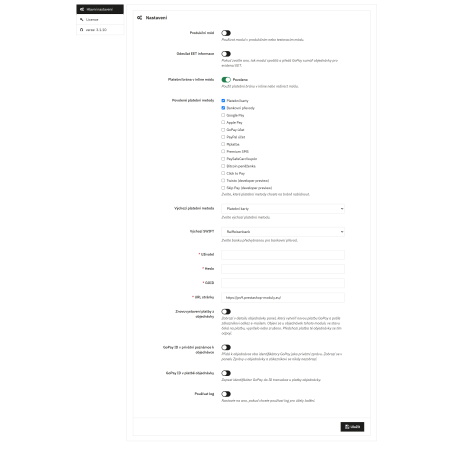
Settings on one page

The examples come from a PrestaShop 9 test store.

Credentials, methods and safeguards

Enter your GoPay credentials, choose the allowed payment methods, the default method and bank. You can test everything in the GoPay test environment.
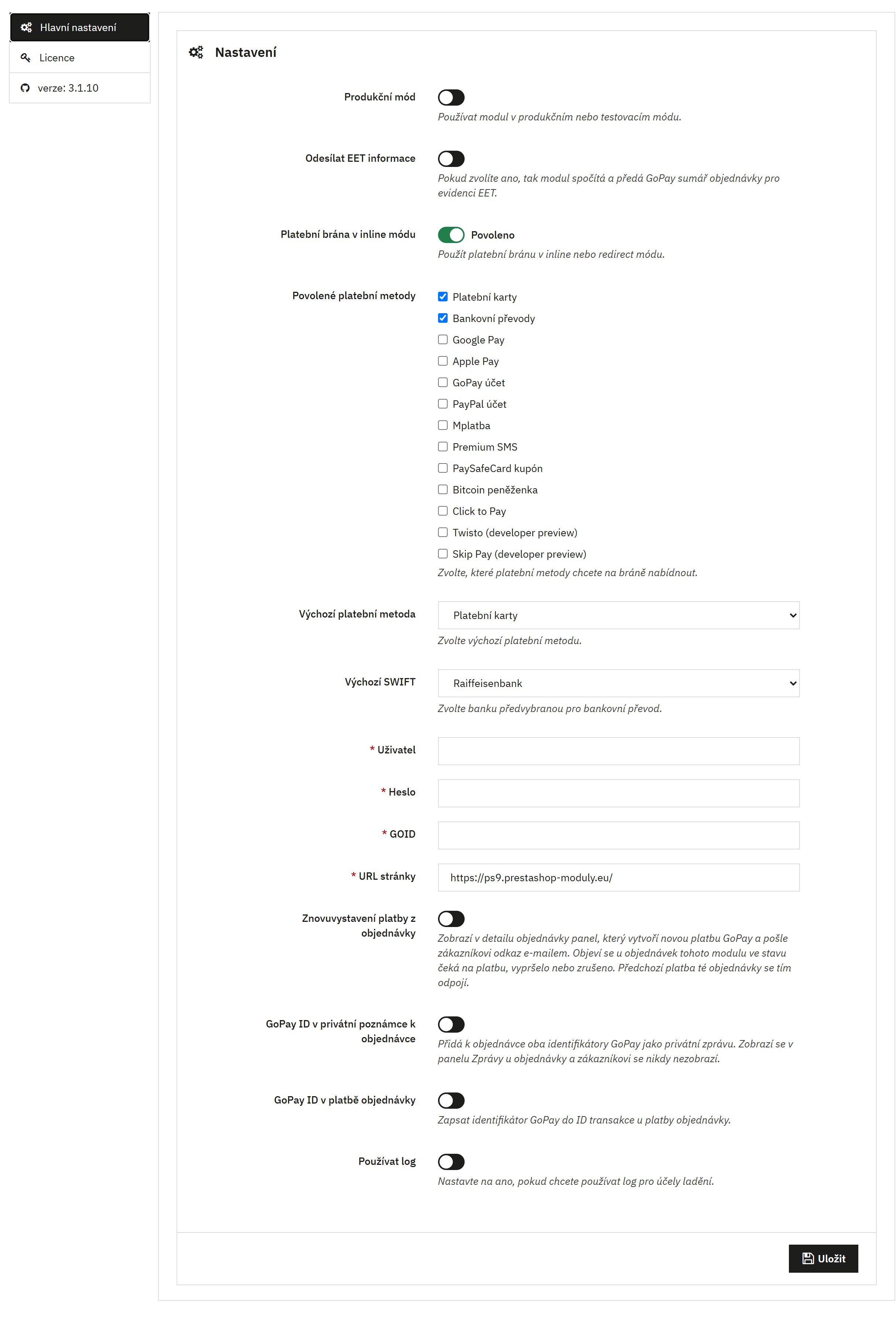
  • 13 GoPay payment methods,
  • new payment link from the order,
  • GoPay ID in the order note and order payment.
GoPay module settings

Configure > Main settings

Features

Everything the module can do

Payments

  • cards, bank transfers, Apple Pay, Google Pay and other GoPay methods
  • default method and bank at the gateway
  • test and production environment
  • order created only after payment or after choosing bank transfer

Orders

  • 9 order statuses with customer e-mails
  • new payment link for an unpaid order
  • GoPay ID column in the order list
  • cron job and GoPay notifications as a safeguard

Technical details

  • multistore
  • PrestaShop 1.6, 1.7, 8 and 9
  • Czech, Slovak, Polish, German, English

Version history

  • 3.1.10 · 24 Nov 2026Fixed typos and clearer Czech texts in the back office and for customers.
  • 3.1.9 · 24 Nov 2026Fix of default bank codes sent to GoPay.
  • 3.1.8 · 24 Nov 2026Fixed price formatting in order messages in PrestaShop 9.
  • 3.1.7 · 23 Nov 2026Module core update.
  • 3.1.6 · 22 Nov 2026Module core update.

FAQ

Questions you ask us

When is the order created?

Once GoPay confirms the payment, or when the customer chooses bank transfer. A canceled payment creates no order.

What if the customer does not return from the bank to the store?

The order is created by a GoPay notification or the cron job. The module also checks that the amount paid matches the cart.

Can I issue refunds from PrestaShop?

No. You refund the payment in the GoPay admin, and the module then sets the order status based on the GoPay notification.

What if the customer does not complete the payment?

For an unpaid order, create a new payment with the button on the order detail page, and the customer receives the link by e-mail.

Does the customer choose the method in the store?

No, the store shows a single “Pay via GoPay” option and the customer chooses the method at the gateway. You can set a preselected method and bank.

Can I test it first?

Yes. With production mode turned off, the module uses the GoPay test environment.

Does it work with the Three-step checkout?

Yes. The module uses the standard PrestaShop payment interface.

Parameters

Technical details

Module labelb4ngopay
Module version3.1.10
Prestashop version1.6, 1.7, 8, 9
Last update24. 11. 2026
License validityUnlimited in time
Support12 months
LocalisationCzech, English, German, Polish, Slovak
Minimum PHP version7.3
PHP Version7.3, 7.4, 8.0, 8.1, 8.2, 8.3

What the price includes

  • module for PrestaShop 1.6, 1.7, 8, 9
  • perpetual licence for 1 domain
  • 12 months of new versions to download in your account
  • 12 months of answers to your questions about the module by e-mail
  • help inside the module and a setup guide
  • invoice with VAT

Installation, setup and custom changes are a paid service. Custom development

Question about the module

Do you have a question about the module?

Tell us what you need to solve in your shop. We will advise whether the module helps you, how to set it up and what else you will need.

Product inquiry

Satisfaction
guarantee
Professional
approach
Technical
support
Online
payment

Get our latest news and special sales

You may unsubscribe at any moment. For that purpose, please find our contact info in the legal notice.