

Payment modules and gateways
Module code
b4npaymentwithfee
Module version
3.1.11
PrestaShop
1.6, 1.7, 8, 9
Updated
23. 11. 2026

Payment method with a fee

Rules for payment methods: depending on the carrier, customer group, currency or cart value, it adds a fee to the payment, gives a discount or hides the payment method. Works with the payment modules you already have.

  • Fee or discount. Fixed amount or percentage, with or without VAT.
  • Payment blocking. For example, cash on delivery above a certain amount.
  • Conditions as you need them. Carrier, payment, group, currency, store, language, cart value.
  • Price shown upfront. The customer sees the fee or discount right next to the payment method.
What you are buying
€59.00
incl. VAT · 48,76 € excl. VAT

Perpetual licence for 1 domain · 12 months of updates and support included

What does the support include?
  • new versions of the module to download in your account
  • answers to your questions about the module by e-mail

Installation, setup and custom changes are a paid service.

€30.00 incl. VAT · €24.79 excl. VAT

The support is extended by 12 months from the end of the current support, an expired one from the payment.

What does the support include?
  • new versions of the module to download in your account
  • answers to your questions about the module by e-mail

Installation, setup and custom changes are a paid service.

The extension is added to a licence in your account.

Sign in
  • Download right after payment
  • We are VAT payers

What it solves

Fee, discount or blocked payment by your rules

Some payment methods cost you more than others. Cash on delivery for expensive orders is risky, and you may want to reward bank transfers. PrestaShop cannot add a fee or a discount to a payment method on its own.

The module adds rules: when the conditions you set are met, it adds a fee to the payment, gives a discount or hides the payment method. It works with the payment modules you already have in your store.

Who it is for

Is this module right for you?

It is for you if

  • you want to charge a fee for cash on delivery or another payment method,
  • you want to reward payment by bank transfer or online,
  • you need to hide a payment method depending on the carrier, amount or customer group,
  • you run PrestaShop 1.6 to 9.

You do not need it if

  • a single cash on delivery with a fee per carrier is enough – that is what the Cash on delivery with a fee module is for,
  • you want to charge a fee for consumer card payments – the law does not allow that.

A fee for a payment method may not exceed your direct costs, and the customer must see it in advance. You must not charge a fee for consumer card payments (Section 254 of the Czech Payment Systems Act No. 370/2017 Coll.).

Benefits

Payments that cost you no more than they have to

A fee for any payment method

Fixed amount or percentage of the product price, with or without VAT. Even for payment modules that cannot add a fee themselves.

Discount for a better payment method

A negative value works as a discount, for example for paying by bank transfer.

Block payments where they make no sense

A rule can hide a payment method, for example cash on delivery above a certain amount.

The conditions you need

Carrier, payment method, customer group, currency, store, language and cart value range.

Customers see the price in advance

The module shows the fee or discount next to the payment method before the customer submits the order.

Multiple currencies

Amounts are converted to the cart currency and rounded to the number of decimal places you set.

How it works

From rule to price in the order

  1. You set up a rule

    Conditions, result (fee, discount or block) and amount.

  2. The customer chooses a payment method

    The module evaluates the rules based on the cart, carrier and customer.

  3. They see the fee or discount

    Next to the payment method – or the payment method is not offered at all.

  4. Order with the fee

    The fee or discount is part of the order price.

What you do once

  • decide which payment methods get a fee or a discount,
  • create rules with conditions,
  • set up rounding for currencies,
  • test an order.

Rather not do it yourself? We will set it up for you.

What the module then does on its own

  • evaluates the rules in every order,
  • adds fees and discounts,
  • hides blocked payment methods,
  • shows the price next to the payment method.

What the module does not do

  • it does not check whether the fee complies with the law,
  • it does not add new payment methods,
  • it does not change product or shipping prices.
Examples

Examples

Rules and payment methods in checkout

Screenshots come from a PrestaShop 9 test store with sample rules.

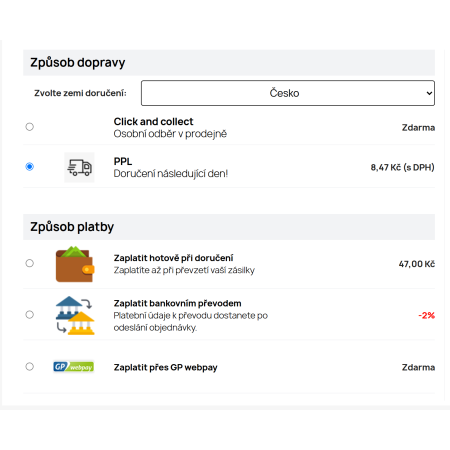
Fee and discount at the payment method

The customer sees the fee or discount for each payment method. Shown here: cash on delivery with PPL for 39 Kč excl. VAT and a 2% discount for bank transfer.
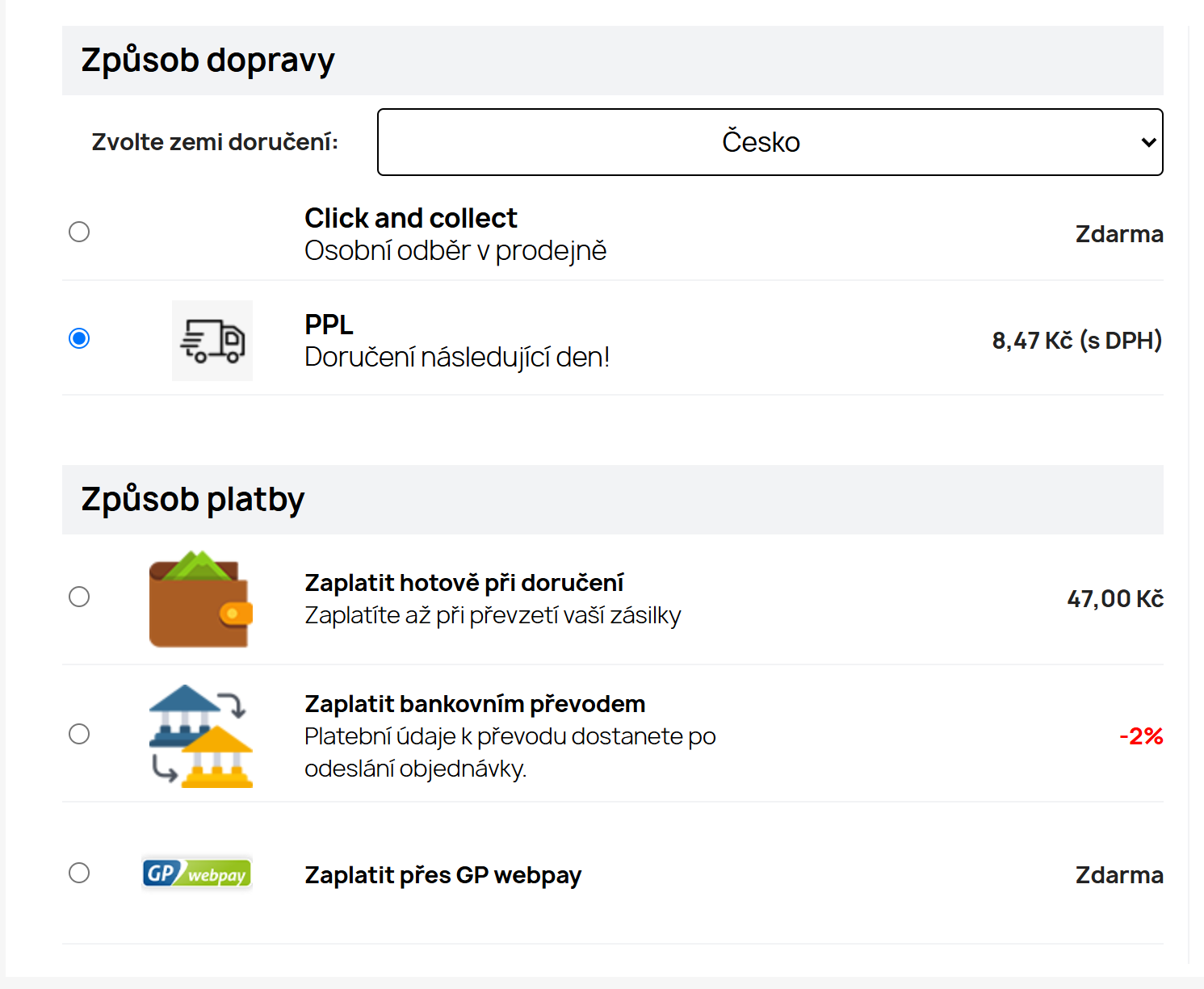
  • fee incl. VAT depending on settings,
  • discount as a percentage or an amount,
  • shown here: the Three-step checkout.
Payment methods with a fee and a discount in checkout

Checkout → Shipping and payment

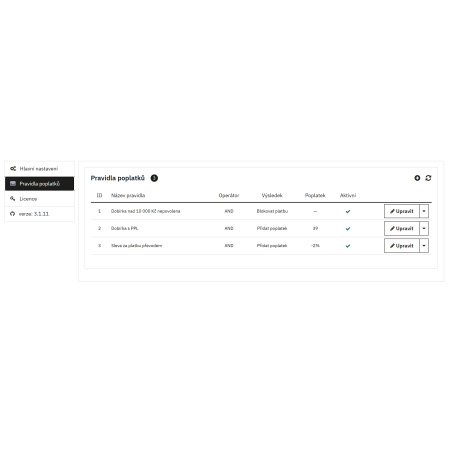
Rule overview

All rules in one place. The first rule whose conditions match applies.
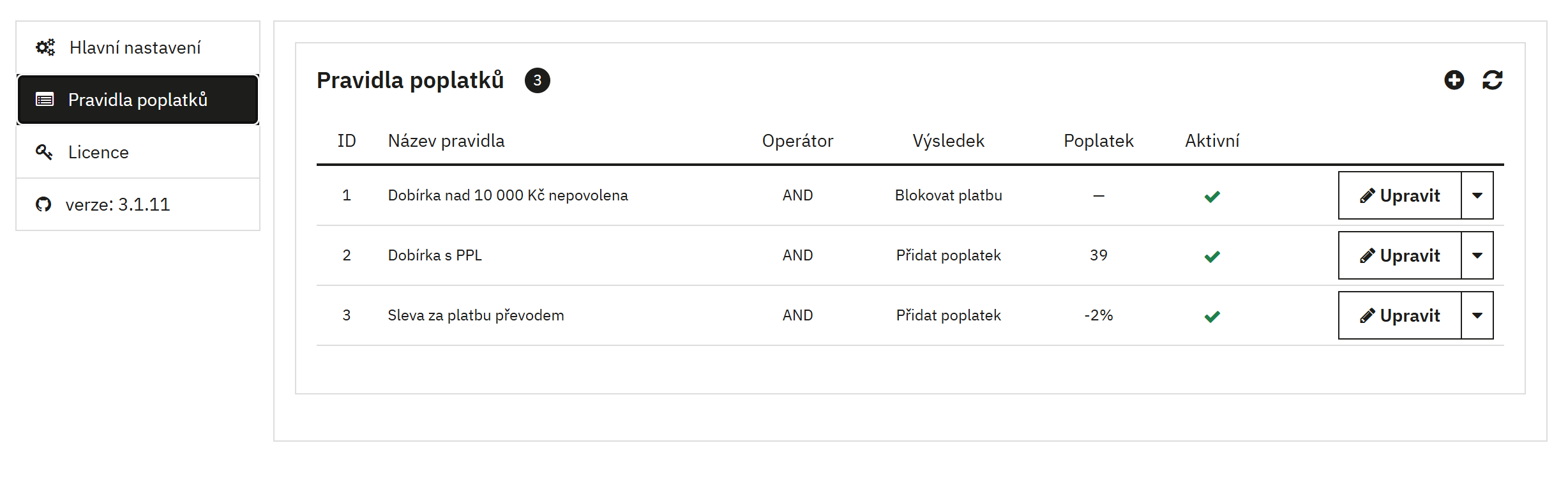
  • fee, discount or payment block,
  • each rule can be turned off,
  • unlimited number of rules.
Overview of fee rules

Configure → Fee rules

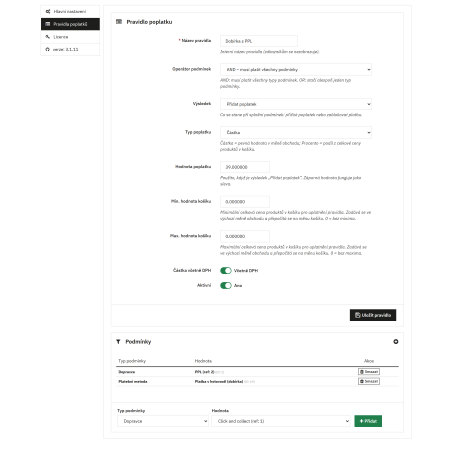
Rule with conditions

For each rule, you set the result, the fee type and amount, and the cart value range. Below it you add conditions: carrier, payment method, customer group, currency, store or language.
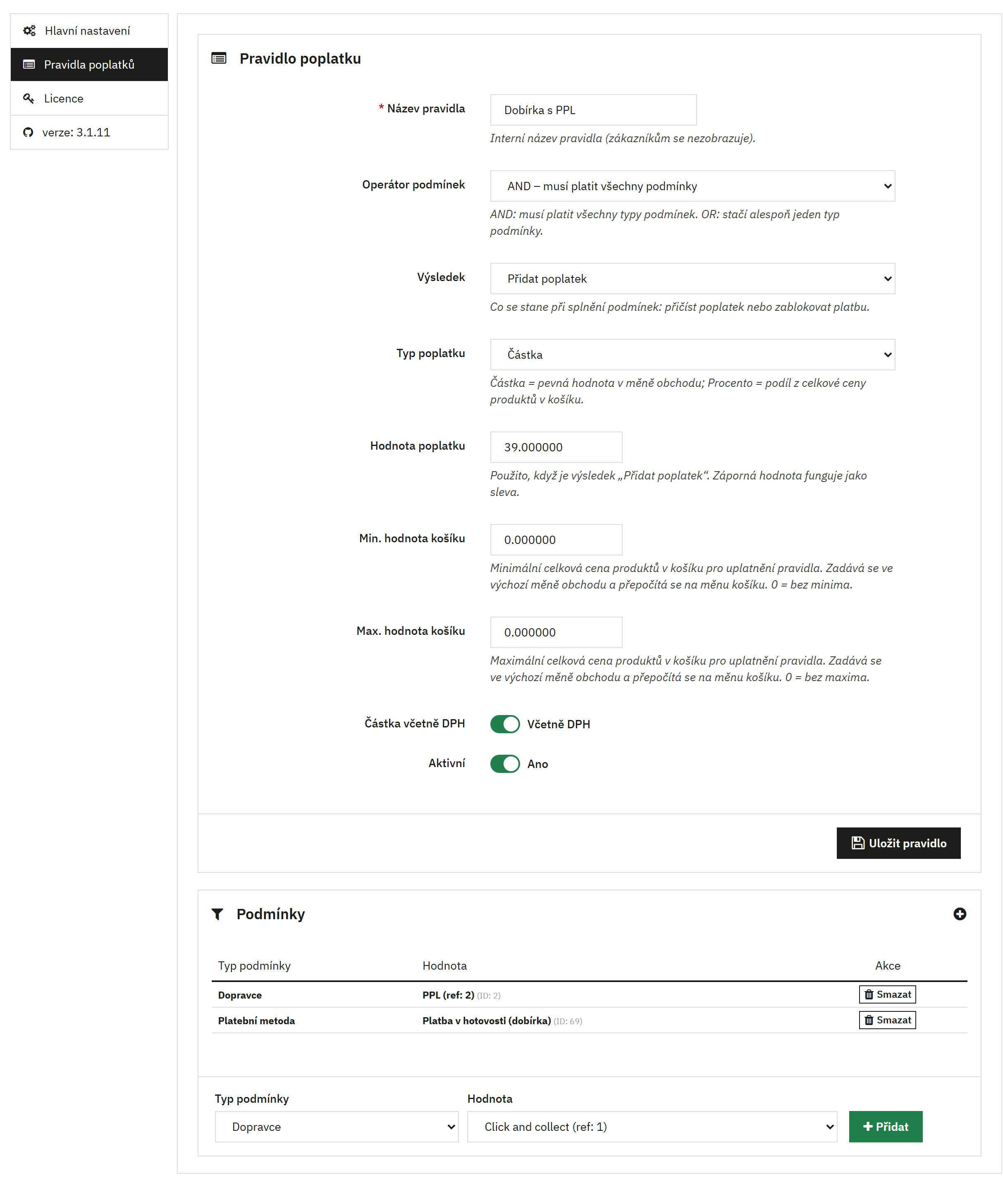
  • all conditions must match, or just one,
  • amount with or without VAT,
  • minimum and maximum cart value.
Fee rule details with conditions

Configure → Fee rules → Edit

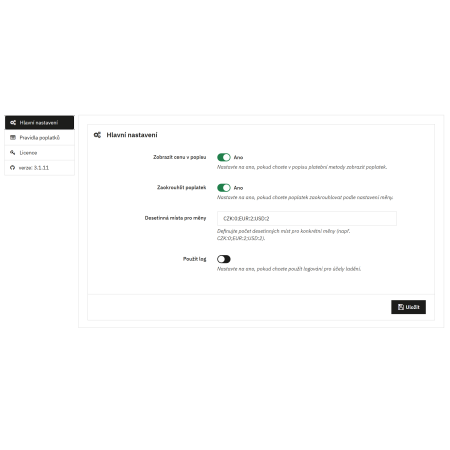
Main settings

Showing the fee in the payment description, rounding and the number of decimal places for each currency.
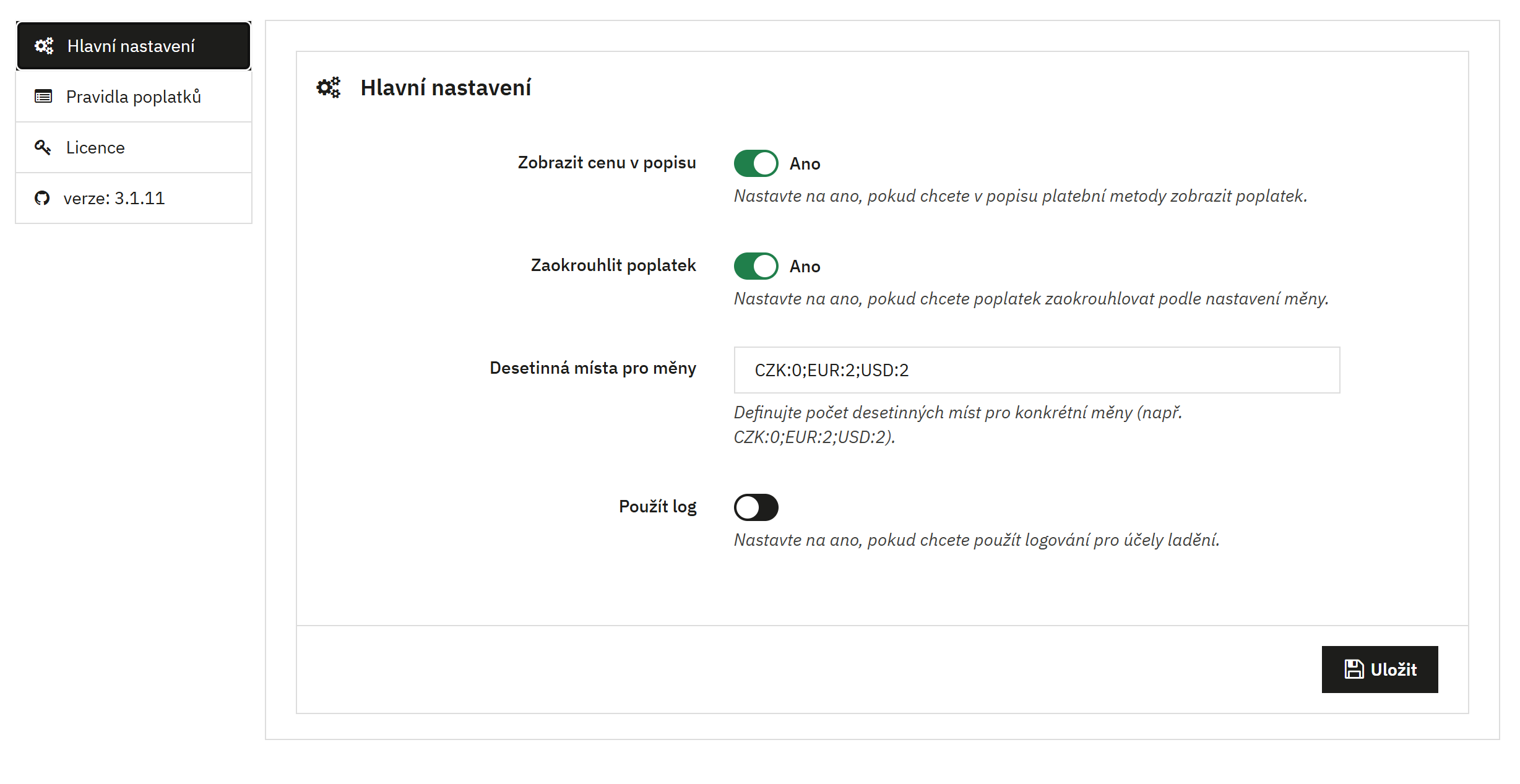
  • for example CZK in whole crowns, EUR to the cent,
  • debug log.
Main settings of the Payment method with a fee module

Configure → Main settings

Features

Everything the module can do

Rule result

  • fee as a fixed amount or percentage
  • discount (negative value)
  • payment block
  • amount with or without VAT

Conditions

  • carrier and payment method
  • customer group, currency, store, language
  • minimum and maximum cart value
  • all conditions or at least one

Back office

  • fee in the payment description
  • rounding by currency
  • PrestaShop 1.6, 1.7, 8 and 9
  • Czech, Slovak, Polish, German, English

Version history

  • 3.1.11 · 23 Nov 2026Translation fix in the fee amount help.
  • 3.1.10 · 23 Nov 2026Core update: the settings now warn about missing data and confirm saving.
  • 3.1.9 · 22 Nov 2026Module core update and security fix.
  • 3.1.8 · 25 Oct 2026Fixed cart amount thresholds for carts in another currency and PrestaShop 9 fixes.
  • 3.1.6 · 29 Jul 2026Fix for an extra parameter in links to the shop's language versions.

FAQ

Questions you ask us

May I charge a fee for card payments?

Not for consumer card payments. The Czech Payment Systems Act does not allow fees for payments subject to a regulated interchange fee. The module does not check this; you set the fee yourself.

How much may I charge for cash on delivery?

At most what cash on delivery costs you directly. The customer must see the fee in advance; the module shows it next to the payment method.

Can I give a discount instead of a fee?

Yes. Enter a negative value and the rule works as a discount, for example for paying by bank transfer.

Can I turn off cash on delivery above a certain amount?

Yes. Create a rule with the result “Block payment”, the cash on delivery payment method and a minimum cart value.

How is it different from the Cash on delivery with a fee module?

Cash on delivery with a fee is a standalone payment method with a fee per carrier. Payment method with a fee adds fees, discounts and blocks to the payment methods you already have in your store.

Does it work with the Three-step checkout?

Yes, the screenshot is taken right from it. The module also works in the default PrestaShop checkout.

Can you help me with the setup?

Yes. You can order turnkey installation and rule setup with the module.

Parameters

Technical details

Module labelb4npaymentwithfee
Module version3.1.11
Prestashop version1.6, 1.7, 8, 9
Last update23. 11. 2026
License validityUnlimited in time
Support12 months
LocalisationCzech, English, German, Polish, Slovak
Minimum PHP version7.3
PHP Version7.3, 7.4, 8.0, 8.1, 8.3

What the price includes

  • module for PrestaShop 1.6, 1.7, 8, 9
  • perpetual licence for 1 domain
  • 12 months of new versions to download in your account
  • 12 months of answers to your questions about the module by e-mail
  • help inside the module and a setup guide
  • invoice with VAT

Installation, setup and custom changes are a paid service. Custom development

Question about the module

Do you have a question about the module?

Tell us what you need to solve in your shop. We will advise whether the module helps you, how to set it up and what else you will need.

Product inquiry

Satisfaction
guarantee
Professional
approach
Technical
support
Online
payment

Get our latest news and special sales

You may unsubscribe at any moment. For that purpose, please find our contact info in the legal notice.